
If you’re working with Salesforce – whether you’re building simple automation, managing complex revenue operations, or handling enterprise-scale integrations – you need to understand Transaction Management in Salesforce. It’s the invisible safety net that keeps your data consistent, your processes reliable, and your business logic intact even when things go wrong.
Think about it this way: You’re processing a customer order. You need to create an Order record, add Order Line Items, update the Account’s Annual Revenue, calculate billing schedules, and trigger fulfillment. All of this has to happen as one atomic unit – if any step fails, the entire order should fail. You can’t end up with an Order but no Line Items. You can’t partially bill a customer. That’s what transaction management guarantees.
But here’s the thing – most developers understand transactions at a surface level. They know DML statements succeed or fail, but they don’t dig into why, how to handle partial failures, what happens under the hood in Salesforce’s multi-tenant architecture, or how to navigate the gotchas that trip up even experienced developers.
This guide walks through everything. Not just the basics, but the edge cases, the architectural decisions, the patterns that work in production, and the mistakes that’ll cost you hours of debugging.
What Exactly Is a Transaction in Salesforce?
A transaction is fundamentally a sequence of database operations – inserts, updates, deletes, upserts – that must complete as a single logical unit. The promise is simple: either all operations succeed, or all operations fail. There’s no middle ground.
But why does this matter in a business context? Imagine you’re building a quote-to-cash system. A quote converts to an Order. That Order should immediately trigger:
- Order Line Item creation with correct pricing
- Account revenue update
- Subscription record creation (if applicable)
- Revenue Recognition entry setup
- Fulfillment notification to warehouse systems
If any of these fails – say, a product is no longer available and Line Item creation fails – you want the entire order conversion to fail. You don’t want an Order without Line Items sitting in your system, waiting to be manually cleaned up.
This is where transactions become critical to business logic, not just database theory.
The ACID Principles: The Foundation of Reliability
Salesforce implements the ACID principles for every transaction. Understanding these isn’t academic – it directly impacts how you design your code.
Atomicity: All or Nothing
Atomicity means that a transaction is indivisible. When you commit changes, either all of them persist, or none of them do. There’s no partially committed state.
Here’s what this looks like in practice:
try {
    Account acc = new Account(Name = 'Enterprise Corp', Industry = 'Technology');
    insert acc;

    Contact con = new Contact(FirstName = 'John', LastName = 'Doe', AccountId = acc.Id);
    insert con;

    Opportunity opp = new Opportunity(Name = 'Enterprise Deal', StageName = 'Prospecting', AccountId = acc.Id);
    insert opp;

} catch (Exception e) {
    // If the Opportunity insert fails, Account and Contact are ALSO rolled back
    System.debug('All records rolled back: ' + e.getMessage());
}
In this code, if the Opportunity insert fails (say, a required field is missing), Salesforce rolls back the Account and Contact inserts too. Your database is left in the state it was before the transaction started.
Without atomicity, you’d end up with orphaned accounts and contacts with no related opportunities.
Consistency: Database Stays Valid
Consistency means that every transaction moves the database from one valid state to another. Validation rules, required fields, foreign key relationships – all constraints are enforced.
If you have a validation rule on Account that says “Annual Revenue must be greater than 0,” and a transaction tries to set Annual Revenue to -1000, the transaction fails. The database stays consistent.
This is particularly important in multi-user environments. When User A updates an Account, they don’t see a partially modified record that User B is still writing to. They see either the old state or the new state – never an in-between.
Isolation: Transactions Don’t Interfere
Isolation ensures that concurrent transactions don’t step on each other’s toes.
Imagine two users simultaneously updating the same Opportunity:
- User A reads the current Close Date: March 31
- User B reads the current Close Date: March 31
- User A updates Close Date to April 15
- User B updates Close Date to May 30
Without isolation, User B’s update might overwrite User A’s update. User A’s change gets lost.
Salesforce prevents this through exclusive row locking. When User A starts modifying the Opportunity, Salesforce locks that record. User B’s request to modify the same record waits (up to 10 seconds) for the lock to be released. If it doesn’t get released in time, User B gets UNABLE_TO_LOCK_ROW error.
The tradeoff? Performance. Locking prevents data corruption but can slow down systems under heavy load.
Durability: Committed Data Survives
Once a transaction commits, it’s permanent. Even if Salesforce’s infrastructure fails immediately after, your data is safe. Salesforce uses write-ahead logging to ensure this – every change is logged to a permanent store before being applied to the database.
Understanding Salesforce’s Architecture for Transactions
Knowing how Salesforce processes transactions under the hood helps you write better code. Here’s the reality:
Salesforce’s infrastructure consists of multiple tiers:
- Application Server Tier: Handles API requests, web UI interactions, and decision-making
- Core App Servers: Typically 10-40 Java Virtual Machines per instance that execute your Apex code, flows, and business logic
- Database Tier: The actual data storage where all changes are committed
But here’s the critical part that most people miss: every single DML operation from a customer must pass through a single database gateway. This isn’t a bottleneck – it’s a design choice to guarantee consistency. All updates are serialized. If two users try to update the same record simultaneously, one transaction must complete before the other can proceed.
This explains why:
- Record locking is necessary
- Deadlocks are possible (and how to avoid them)
- Bulk operations are faster (one serialized request instead of many)
- Concurrent updates on the same record cause contention
When you’re processing thousands of records, you need to be aware of this architecture. Updating records in a random order might cause deadlocks. Updating in a consistent order (always Account before Contact before Opportunity) minimizes lock contention.
Transaction Finalization: When Data Actually Commits
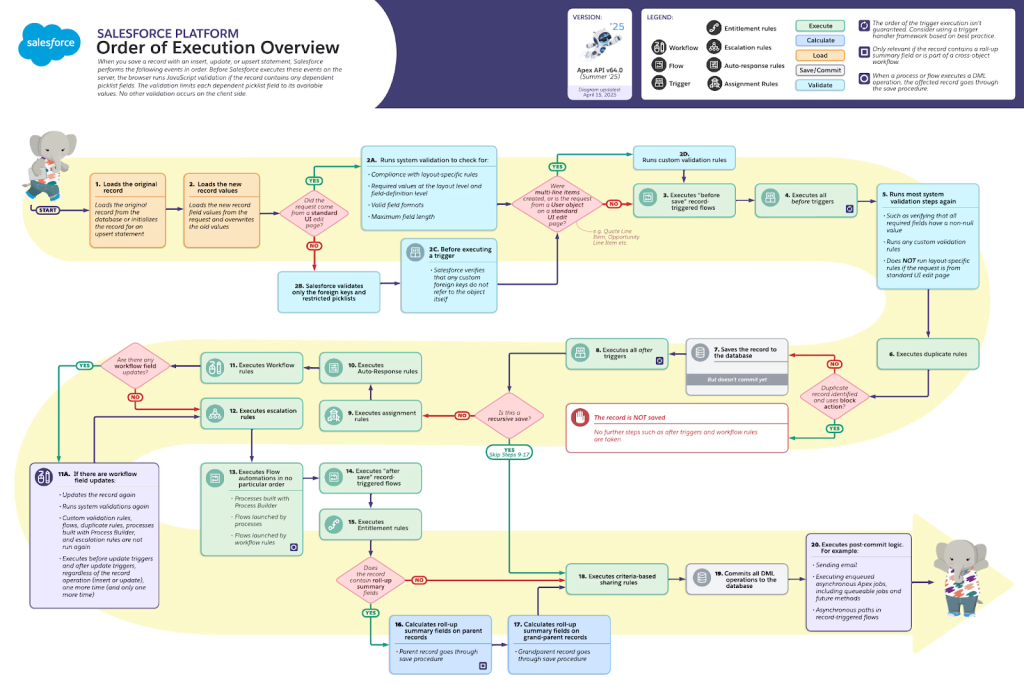
Official Salesforce Order of Execution Flowchart
This is where most developers get confused. Data is not committed to the database until the very end of the order of execution, after all after-triggers have successfully completed.
Here’s the precise flow:
- Before Triggers Execute → Record is modified in memory
- Validation Rules Execute → Check constraints
- Record is Saved to Database Buffer (but NOT committed yet)
- After Triggers Execute → Can modify related records
- All Automation Completes (Flows, Processes, Workflows)
- Only Then: Data is Committed → Now it’s permanent
This is critical because if an after-trigger throws an exception, or a flow fails, or any subsequent logic fails, the entire transaction rolls back – including the record that was “saved” in step 3.
trigger AccountTriggerAfter on Account (after insert) {
    if (Trigger.isAfter && Trigger.isInsert) {
        for (Account acc : Trigger.new) {
            // This executes after the Account insert, but before commit
            List<Contact> contacts = new List<Contact>();
            contacts.add(new Contact(FirstName = 'Default', LastName = 'Contact', AccountId = acc.Id));
            insert contacts; // If this fails, Account insert is ROLLED BACK
        }
    }
}
If the Contact insert fails in this after-trigger, the Account that was inserted in step 3 is not committed. It’s rolled back as if the entire transaction failed.
This is why after-triggers are risky – they can undo work done by before-triggers if they fail.
DML Operations: The Different Execution Paths
Not all DML operations behave the same way. This distinction is crucial for production code.
Standard DML: All-or-Nothing Semantics
Standard DML statements (insert, update, delete, upsert) follow strict all-or-nothing semantics:
List<Account> accounts = new List<Account>();
accounts.add(new Account(Name = 'Company A'));
accounts.add(new Account(Name = 'Company B'));
accounts.add(new Account()); // Missing required Name field

// This entire statement fails - ALL three accounts fail to insert
insert accounts;
If even one record fails validation, the entire operation rolls back. No records are inserted. The database is left unchanged.
This is great for data integrity but problematic if you’re trying to process a large batch where some records might legitimately fail (like in an integration scenario where some external records are invalid).
Database Methods: Partial Success Semantics
The Database class provides methods that allow partial success:
List<Account> accounts = new List<Account>();
accounts.add(new Account(Name = 'Company A'));
accounts.add(new Account()); // Missing required Name

// With second parameter as false, allows partial success
List<Database.SaveResult> results = Database.insert(accounts, false);

for (Database.SaveResult result : results) {
    if (result.isSuccess()) {
        System.debug('Account inserted: ' + result.getId());
    } else {
        for (Database.Error error : result.getErrors()) {
            System.debug('Error on account: ' + error.getMessage());
        }
    }
}
In this case, Company A inserts successfully. Company B fails validation, but you’re aware of the failure and can handle it. The transaction succeeds (at least partially).
This matters enormously in real scenarios:
- Bulk API integration: Some external records are valid, some aren’t. You want to save what you can.
- Data imports: Process 10,000 records. If 9,900 are valid and 100 are malformed, you want to import the 9,900.
- Async processing: Batch apex processes large datasets. You don’t want one bad record to fail the entire batch.
But partial success also means you need robust error handling. You can’t assume all records succeeded.
Savepoints: The Undo Button Within a Transaction
One of the most powerful features in Salesforce transaction management is the savepoint. A savepoint marks a specific point in your transaction where you can later roll back if something goes wrong.
Think of it like this: You’re editing a document. You save it (savepoint). Then you make some changes. If those changes are bad, you reload from the last save.
Savepoint sp = Database.setSavepoint();

try {
    Account acc = new Account(Name = 'Test Account');
    insert acc;
    System.debug('Account inserted successfully');

    // Now try to do something risky
    Integer result = 1 / 0; // This will throw an exception

} catch (Exception e) {
    // Roll back to the savepoint - the Account insert is undone
    Database.rollback(sp);
    System.debug('Transaction rolled back. Account was NOT inserted.');
}
Savepoints are incredibly useful for complex business logic where you want to partially undo work:
Savepoint beforeBillingCalculation = Database.setSavepoint();

try {
    // Create order
    Order ord = new Order(AccountId = accId, Status = 'Draft');
    insert ord;

    // Create line items
    List<OrderItem> lineItems = new List<OrderItem>();
    for (Product2 prod : products) {
        lineItems.add(new OrderItem(OrderId = ord.Id, Product2Id = prod.Id, Quantity = 1));
    }
    insert lineItems;

    // Calculate billing
    calculateBillingSchedules(ord);

} catch (BillingCalculationException e) {
    // Only the billing calculation failed, not the order or line items
    Database.rollback(beforeBillingCalculation);

    // Now we can try an alternative billing approach
    calculateDefaultBilling(ord);
}
However, savepoints have important limitations:
You can only create 5 savepoints per transaction. Each savepoint counts as a DML statement against your limit. If you need more than 5 undo points, you need a different strategy.
// This will fail after the 5th savepoint
Savepoint sp1 = Database.setSavepoint(); // 1st
Savepoint sp2 = Database.setSavepoint(); // 2nd
Savepoint sp3 = Database.setSavepoint(); // 3rd
Savepoint sp4 = Database.setSavepoint(); // 4th
Savepoint sp5 = Database.setSavepoint(); // 5th
Savepoint sp6 = Database.setSavepoint(); // EXCEPTION: Too many savepoints
Savepoint scope doesn’t cross trigger invocations. If you set a savepoint in a before-insert trigger and try to roll back in an after-insert trigger, it won’t work. Each trigger context has its own transaction.
Once you roll back to a savepoint, any savepoints created after it become invalid. You can’t selectively “undo” specific savepoints.
These limitations mean savepoints are best used for handling a specific risky operation, not for designing complex transaction flows.
Governor Limits: The Constraints That Define Your Transaction Scope
Every Salesforce transaction has hard limits on resources. These exist to protect the multi-tenant platform and ensure no single customer’s code hogs resources.
Here are the limits that matter most for transaction management:
Per-Transaction DML Limits
- Synchronous transactions: 150 DML statements
- Asynchronous transactions (Batch/Future): 1,650 DML statements
- Batch Apex execute method: 150 DML statements (limits reset for each batch)
A “DML statement” is a single insert, update, delete, or upsert call. Bulking helps you stay under this limit:
// BAD: 100 DML statements (hits limit immediately)
for (Integer i = 0; i < 100; i++) {
    insert new Account(Name = 'Account ' + i);
}

// GOOD: 1 DML statement
List<Account> accounts = new List<Account>();
for (Integer i = 0; i < 100; i++) {
    accounts.add(new Account(Name = 'Account ' + i));
}
insert accounts;
Per-Transaction Query Limits
- Synchronous: 100 SOQL queries
- Asynchronous: 200 SOQL queries
Exceeding these is common in loops:
// BAD: If accounts has 100+ records, you hit 100 queries
for (Account acc : accounts) {
    Contact con = [SELECT Id FROM Contact WHERE AccountId = :acc.Id];
    // Process contact
}

// GOOD: 1 query
Map<Id, Contact> contactsByAccountId = new Map<Id, Contact>();
for (Contact con : [SELECT Id, AccountId FROM Contact WHERE AccountId IN :accountIds]) {
    contactsByAccountId.put(con.AccountId, con);
}

for (Account acc : accounts) {
    Contact con = contactsByAccountId.get(acc.Id);
    // Process contact
}
Record Retrieval Limits
- Total records retrieved per transaction: 50,000
- This counts all records returned by SOQL/SOSL queries
If you’re processing large datasets, this becomes a real constraint. Batch Apex exists partly to overcome this – each batch execution gets a fresh 50,000-record limit.
Other Critical Limits
- Heap Size: 6 MB for synchronous, 12 MB for asynchronous
- CPU Time: 10,000ms for synchronous, 60,000ms for batch
- Callouts: 100 per transaction (but can’t be mixed with uncommitted DML)
When you hit a governor limit, Salesforce throws a LimitException and your entire transaction rolls back:
for (Integer i = 0; i <= 150; i++) {
    List<Account> accounts = [SELECT Id FROM Account LIMIT 1];
    // After 100 queries, you get:
    // QueryException: Too many SOQL queries: 101
}
Understanding these limits is essential for designing scalable solutions. It’s why:
- Batch Apex is better than loops for large datasets (resets limits per batch)
- Bulk operations are essential (one DML = one statement)
- You can’t call out from triggers without careful planning
- Async processing is necessary for complex operations
Record Locking and Concurrency: The Hardest Part of Transactions
Record locking is where transaction management gets genuinely complex. It’s also where most production issues come from.
When a transaction modifies a record, Salesforce places an exclusive lock on that record. No other transaction can modify it until the lock is released (when the first transaction commits or rolls back).
This prevents data corruption but creates the potential for deadlocks and lock contention.
Exclusive Locking and Lock Contention
Imagine a busy system processing orders. Thousands of users are simultaneously creating, updating, and converting orders.
When User A updates an Order:
Order ord = [SELECT Id, Amount FROM Order WHERE Id = :orderId FOR UPDATE];
ord.Amount = ord.Amount + 100;
update ord;
The FOR UPDATE clause explicitly acquires an exclusive lock before modifying. This prevents other transactions from reading the record (in a consistent way) or modifying it.
If User B tries to update the same Order while User A’s transaction is still running, User B’s request waits. For up to 10 seconds. If the lock isn’t released by then, User B gets UNABLE_TO_LOCK_ROW.
In high-volume systems, this timeout happens constantly. Users see errors. Integrations fail.
The solution is to minimize lock contention:
- Keep transactions short: Don’t perform long-running operations while holding locks
- Update in consistent order: Always update Accounts before Opportunities before Orders
- Avoid hot records: If certain records are updated constantly, consider denormalizing to separate, less-contended records
- Use batch processing for bulk updates: Instead of updating 10,000 records in real-time, batch them in scheduled jobs
Deadlocks: The Classic Problem
A deadlock occurs when two transactions are waiting on each other, neither able to proceed.
User A’s Transaction:
- Locks Opportunity 1
- Tries to lock Opportunity 2 (waiting…)
User B’s Transaction:
- Locks Opportunity 2
- Tries to lock Opportunity 1 (waiting…)
Neither can proceed. Salesforce detects this and kills one of the transactions with UNABLE_TO_LOCK_ROW.
The classic way to prevent deadlocks is lock ordering: Always acquire locks in the same order.
// In Transaction A
Opportunity opp1 = [SELECT Id FROM Opportunity WHERE Id = :opp1Id FOR UPDATE];
Opportunity opp2 = [SELECT Id FROM Opportunity WHERE Id = :opp2Id FOR UPDATE];

// In Transaction B (different user)
Opportunity opp2 = [SELECT Id FROM Opportunity WHERE Id = :opp2Id FOR UPDATE];
Opportunity opp1 = [SELECT Id FROM Opportunity WHERE Id = :opp1Id FOR UPDATE]; // This causes deadlock!
If Transaction B always queries in the same order (opp1 then opp2), deadlocks are prevented.
Parent-Child Locking Complexity
Here’s something many developers don’t realize: when you update a child record, Salesforce also locks the parent.
If you have a deeply nested relationship:
- Account (parent)
- Order (child of Account)
- OrderItem (child of Order)
- Order (child of Account)
And you update OrderItem, you implicitly lock:
- OrderItem
- Order
- Account
If you have 100 concurrent threads updating OrderItems on the same Account, they’re all waiting on the Account lock. This creates massive contention.
Solutions:
- Denormalize to reduce relationship depth
- Batch updates to non-peak hours
- Use scheduled Apex for bulk updates instead of real-time processing
- Consider separating concerns into different objects
Transaction Boundaries and Trigger Context
Triggers are often misunderstood in terms of transaction boundaries. The key rule: a trigger fires within the transaction of the record being modified.
So when you update an Account:
- Before-insert trigger fires (still in original transaction)
- Record is inserted
- After-insert trigger fires (still in original transaction)
- Transaction commits only after all after-insert logic completes
All within a single transaction boundary. If the after-insert trigger throws an exception, the Account insert is rolled back.
Trigger Execution Order Gotchas
If you have multiple triggers on the same object for the same event (e.g., two before-insert triggers), the order in which they fire is not guaranteed. This is a major gotcha because your code might depend on execution order.
If Trigger A updates a field that Trigger B reads, and they fire in reverse order, your logic breaks.
The solution is to use a trigger framework that controls execution order:
// Trigger framework pattern
trigger AccountTrigger on Account (before insert, after insert, before update, after update) {
    TriggerDispatcher.run();
}

public class TriggerDispatcher {
    public static void run() {
        if (Trigger.isInsert && Trigger.isBefore) {
            // Call before-insert handlers in specific order
            AccountBeforeInsertHandler.handle(Trigger.new);
        } else if (Trigger.isInsert && Trigger.isAfter) {
            // Call after-insert handlers in specific order
            AccountAfterInsertHandler.handle(Trigger.new, Trigger.oldMap);
        }
        // ... etc
    }
}
Flow Transaction Boundaries (Critical Detail)
This is where things get tricky. When you have a Flow triggered on a record update:
Transaction 1 (synchronous): Record is updated by the original action
Flow starts → If it contains a Screen element
Transaction 2 (new synchronous): After the screen, a new transaction starts
If something fails in Transaction 2, Transaction 1 isn’t rolled back. Your original update is committed even if downstream operations fail.
This is a major source of data inconsistency bugs:
// Flow triggered on Order update
// Transaction 1: Order.Status updated to "Activated"
// [Flow reaches Screen element - Transaction 1 ends here, Transaction 2 starts]
// Transaction 2: Create fulfillment records
// If fulfillment creation fails, Order is still "Activated"
This is why you need to be careful with Flow design. If a Flow has a Screen element followed by Create Record actions, and the Create fails, your original update isn’t undone.
Local Action and Wait elements also create transaction boundaries.
Asynchronous Processing: Different Transaction Boundaries
When you use asynchronous processing (Batch Apex, Queueable, Future methods, or Scheduled Apex), each execution runs in a separate transaction with its own governor limits.
Batch Apex: Transaction Per Batch
Batch Apex runs records in batches. Each batch gets its own transaction:
global class ProcessAccountsBatch implements Database.Batchable<sObject> {
    global Database.QueryLocator start(Database.BatchableContext bc) {
        return Database.getQueryLocator('SELECT Id FROM Account');
    }

    global void execute(Database.BatchableContext bc, List<Account> accounts) {
        // This is ONE transaction
        // Governor limits reset here
        for (Account acc : accounts) {
            acc.Description = 'Processed';
        }
        update accounts;
    }

    global void finish(Database.BatchableContext bc) {
        // Another transaction
    }
}
Each execute() call is a separate transaction. If batch 1 succeeds but batch 2 fails, batch 1’s changes are NOT rolled back.
This is by design. It allows processing of massive datasets without one bad batch killing everything.
The tradeoff: You can’t guarantee transaction consistency across batches. If you’re processing a million-record migration and batch 500 fails, you’ve already committed 499 batches. You have a partially migrated database.
This is why Batch Apex often needs a “finish” method that validates and potentially triggers compensation logic.
Queueable Apex: Separate Transaction, Job Chaining
Queueable is similar to Batch but more flexible. Each execute() runs in its own transaction, and you can chain jobs:
public class FirstJob implements Queueable {
    public void execute(QueueableContext context) {
        // Insert some records
        insert new Account(Name = 'From Job 1');

        // Chain the next job
        if (shouldContinue()) {
            System.enqueueJob(new SecondJob());
        }
    }
}

public class SecondJob implements Queueable {
    public void execute(QueueableContext context) {
        // Insert more records
        insert new Account(Name = 'From Job 2');
    }
}
Each job is a separate transaction, but you can chain them. This is useful for modularizing long operations or processing based on runtime conditions.
Important: The maximum stack depth for chained jobs is 5 in most orgs (meaning you can chain 4 times). In Developer Edition, it’s limited to 5 total depth.
Future Methods: Simple Async, No Job Info
Future methods are the simplest form of async:
@future
public static void sendNotification(Id orderId) {
    Order ord = [SELECT Id, AccountId FROM Order WHERE Id = :orderId];
    // Send notification
}
Fired when system resources are available. Runs in its own transaction. Can’t return data to the calling transaction.
Scheduled Apex: Deterministic Timing
Scheduled Apex runs at specific times but still respects transaction boundaries:
global class DailyOrderProcessing implements Schedulable {
    global void execute(SchedulableContext context) {
        // Process orders
        List<Order> orders = [SELECT Id FROM Order WHERE Status = 'Pending'];
        for (Order ord : orders) {
            ord.Status = 'Processing';
        }
        update orders;
    }
}
The execution runs in a transaction. If it fails, everything rolls back.
Bulk API 2.0 Transaction Management
Bulk API 2.0 is fundamentally different from Apex in terms of transactions. It’s designed for massive data operations.
Key difference: Bulk API 2.0 doesn’t use traditional Apex transaction semantics. Instead:
- You create a job
- Upload data in batches
- Tell Salesforce processing is complete
- Salesforce processes each batch independently
- Each batch has its own transaction
This means if Batch 1 fails, Batch 2 might still succeed. Bulk API doesn’t enforce atomicity across batches.
Bulk API Job Lifecycle:
1. Create Job
   ↓
2. Upload Batch 1 → Processes with separate transaction
3. Upload Batch 2 → Processes with separate transaction
4. Mark job complete
   ↓
5. Salesforce processes all batches independently
   - Batch 1 succeeds? Commits.
   - Batch 2 fails? Rolls back just Batch 2.
   - Overall job status: "Partial Success"
For Bulk API 2.0, the effective governor limits are the higher of synchronous or asynchronous limits, so you get the async limits (more lenient).
This is perfect for bulk data loads but means you need to handle partial success in your code.
The Callout Conundrum: Why You Can’t Mix Callouts and DML
Here’s a rule that confuses everyone: You can’t make HTTP callouts with uncommitted DML.
try {
    Account acc = new Account(Name = 'New Account');
    insert acc; // Insert happens, but not yet committed

    // This will throw CALLOUT_NOT_AVAILABLE exception
    Http http = new Http();
    HttpRequest req = new HttpRequest();
    req.setEndpoint('https://api.example.com/verify');
    req.setMethod('GET');
    HttpResponse res = http.send(req);

} catch (CalloutException e) {
    System.debug('Callout failed: ' + e.getMessage());
}
Why? Because callouts are inherently unreliable. They can timeout, fail, or hang indefinitely. Salesforce can’t guarantee that a callout will succeed, so it won’t let you make a callout while changes are pending – it could leave your database in an inconsistent state.
The workaround is to commit the transaction before calling out:
try {
    Account acc = new Account(Name = 'New Account');
    insert acc; // Committed

    // Now we can call out (transaction is closed)
    Http http = new Http();
    HttpRequest req = new HttpRequest();
    req.setEndpoint('https://api.example.com/verify?accountId=' + acc.Id);
    req.setMethod('GET');
    HttpResponse res = http.send(req);

} catch (Exception e) {
    System.debug('Error: ' + e.getMessage());
}
Or use a Future method to separate the callout into its own transaction:
// In your main transaction
Account acc = new Account(Name = 'New Account');
insert acc;

// Enqueue the callout separately
sendVerificationAsync(acc.Id);

@future(callout = true)
private static void sendVerificationAsync(Id accountId) {
    Http http = new Http();
    // Make the callout
}
This is crucial for integrations. You can’t validate external systems within the same transaction as your Salesforce DML.
Mixed DML Operations: The Setup Object Constraint
Salesforce has an unusual constraint: you can’t mix DML operations on setup objects and non-setup objects in the same transaction.
Setup objects affect user access. They include:
- User
- UserRole
- Permission Set
- Permission Set Assignment
- Territory
- User Territory
- ObjectPermissions
- FieldPermissions
Non-setup objects are everything else (Account, Contact, Opportunity, custom objects, etc.).
This restriction exists to prevent permission-related issues. If you’re updating a User’s permission set and simultaneously creating records that the user would see, Salesforce can’t guarantee the user sees the correct records.
try {
    // Update a non-setup object
    Account acc = new Account(Name = 'Test');
    insert acc;

    // Try to update a setup object
    PermissionSet ps = [SELECT Id FROM PermissionSet WHERE Name = 'Custom_Permission'];
    // This throws MIXED_DML_OPERATION exception

} catch (Exception e) {
    System.debug('Mixed DML error: ' + e.getMessage());
}
The solution is to separate them into different transactions:
// Async method for setup object operations
@future
public static void updatePermissionsAsync() {
    PermissionSet ps = [SELECT Id FROM PermissionSet WHERE Name = 'Custom_Permission'];
    PermissionSetAssignment psa = new PermissionSetAssignment(
        PermissionSetId = ps.Id,
        AssigneeId = userId
    );
    insert psa;
}

// Main transaction handles non-setup objects
Account acc = new Account(Name = 'Test');
insert acc;

// Trigger permission update separately
updatePermissionsAsync();
Platform Events and Transaction Finalization
Platform events are a powerful pattern for decoupling operations within a transaction. They’re published either immediately or after commit, depending on configuration.
// In your transaction
Order ord = new Order(AccountId = accId);
insert ord;

// Publish event
OrderCreated__e event = new OrderCreated__e(
    Order_Id__c = ord.Id,
    Account_Id__c = ord.AccountId
);
EventBus.publish(event);
If the event is configured to publish after commit, it’s only sent to subscribers once your transaction successfully commits. If something fails and rolls back, the event is never published.
This is perfect for triggering downstream processes (like fulfillment notifications) only after you’re sure the order is committed.
// The event is only published after this transaction commits successfully
try {
    createOrder(orderId);
} catch (Exception e) {
    // If order creation fails, the event is never published
}
Real-World Patterns in Revenue Cloud
Revenue Cloud (formerly RLM) is where transaction management gets complex. The entire quote-to-cash flow is a series of dependent transactions.
Quote Creation Transaction
When a user creates a quote:
- Quote record is inserted
- Quote Line Items are created based on product selections
- Pricing calculations occur
- Discounts are applied
- Commission calculations happen
All of this must succeed atomically. If pricing calculation fails, the entire quote creation fails.
Quote Validation and Approval
Once created, quotes go through validation:
- Required fields are checked
- Discount limits are validated
- Product availability is confirmed
- Customer credit checks happen (possibly via callout)
These validations create separate transaction boundaries. If a callout (credit check) fails, the quote isn’t rolled back – just the approval is denied.
Quote to Order Conversion
The most complex part. Converting a quote to an order:
- Create Order record with quote data
- Create Order Line Items matching Quote Line Items
- Lock prices (prevent future changes)
- Calculate line-item net amounts
- Calculate totals and tax
- Create subscription records (if applicable)
- Mark original quote as superseded
If any step fails, the entire conversion should fail. This is where savepoints become useful:
Savepoint beforeConversion = Database.setSavepoint();

try {
    Order ord = new Order(
        AccountId = quote.AccountId,
        QuoteId = quote.Id
    );
    insert ord;

    List<OrderItem> items = new List<OrderItem>();
    for (QuoteLineItem qli : quote.QuoteLineItems) {
        items.add(new OrderItem(
            OrderId = ord.Id,
            Product2Id = qli.Product2Id,
            Quantity = qli.Quantity,
            UnitPrice = qli.UnitPrice
        ));
    }
    insert items;

    // Calculate taxes and totals
    calculateOrderTotals(ord);

} catch (Exception e) {
    Database.rollback(beforeConversion);
    throw new QuoteConversionException('Conversion failed: ' + e.getMessage());
}
Error Handling and Exception Management
Production transaction management isn’t just about preventing errors – it’s about handling them gracefully.
Here’s a realistic production pattern:
public class OrderProcessor {
    public static void processOrder(Id orderId) {
        Savepoint sp = Database.setSavepoint();

        try {
            Order ord = [SELECT Id, AccountId, Amount, Status FROM Order WHERE Id = :orderId];

            // Validate before doing anything
            validateOrder(ord);

            // Create billing records
            List<Billing__c> billings = createBillingRecords(ord);
            insert billings;

            // Create fulfillment records
            List<Fulfillment__c> fulfillments = createFulfillmentRecords(ord);
            insert fulfillments;

            // Mark order as activated
            ord.Status = 'Activated';
            ord.Activated_Date__c = System.now();
            update ord;

            // Log success
            logTransaction(orderId, 'SUCCESS', null);

            // Publish event for downstream processes
            EventBus.publish(new Order_Activated__e(Order_Id__c = orderId));

        } catch (ValidationException e) {
            // Business logic failed - roll back and notify
            Database.rollback(sp);
            logTransaction(orderId, 'VALIDATION_FAILED', e.getMessage());
            sendErrorNotification(orderId, 'Order validation failed: ' + e.getMessage());

        } catch (Exception e) {
            // Unexpected error - log everything
            Database.rollback(sp);
            logTransaction(orderId, 'SYSTEM_ERROR', e.getMessage() + ' | ' + e.getStackTraceString());

            // Publish error event for alerting
            EventBus.publish(new Order_Processing_Error__e(
                Order_Id__c = orderId,
                Error_Message__c = e.getMessage(),
                Stack_Trace__c = e.getStackTraceString()
            ));

            // Re-throw if appropriate
            throw e;
        }
    }

    private static void validateOrder(Order ord) {
        if (String.isBlank(ord.AccountId)) {
            throw new ValidationException('Order must have an Account');
        }

        if (ord.Amount <= 0) {
            throw new ValidationException('Order amount must be greater than 0');
        }

        if (ord.Status != 'Draft') {
            throw new ValidationException('Only Draft orders can be activated');
        }
    }

    private static void logTransaction(Id orderId, String status, String errorMsg) {
        Order_Transaction_Log__c log = new Order_Transaction_Log__c(
            Order__c = orderId,
            Status__c = status,
            Error_Message__c = errorMsg,
            Processed_At__c = System.now()
        );
        insert log;
    }

    private static void sendErrorNotification(Id orderId, String message) {
        // Send async to avoid mixing with DML
        sendNotificationAsync(orderId, message);
    }

    @future
    private static void sendNotificationAsync(Id orderId, String message) {
        // Send email or post to Slack
    }
}
This pattern:
- Uses savepoints for rollback control
- Validates early (fail fast)
- Has specific exception handling for different failure modes
- Logs all transactions for audit
- Uses async for notifications (avoid callout constraints)
- Re-throws for caller notification when appropriate
Limits Class: Monitoring Your Transaction
Salesforce provides the Limits class to monitor your resource consumption within a transaction:
public static void monitorTransactionLimits() {
    System.debug('DML Statements: ' + Limits.getDmlStatements() + ' / ' + Limits.getLimitDmlStatements());
    System.debug('SOQL Queries: ' + Limits.getQueries() + ' / ' + Limits.getLimitQueries());
    System.debug('Heap Size: ' + Limits.getHeapSize() + ' / ' + Limits.getLimitHeapSize());
    System.debug('CPU Time: ' + Limits.getCpuTime() + ' / ' + Limits.getLimitCpuTime());
    System.debug('Callouts: ' + Limits.getCallouts() + ' / ' + Limits.getLimitCallouts());
}
Use this to understand your transaction’s resource consumption and optimize accordingly:
List<Account> accounts = [SELECT Id FROM Account LIMIT 1000];

System.debug('Before loop - Queries: ' + Limits.getQueries());

for (Account acc : accounts) {
    // This is inefficient but Limits will show it
    List<Contact> contacts = [SELECT Id FROM Contact WHERE AccountId = :acc.Id];
}

System.debug('After loop - Queries: ' + Limits.getQueries()); // Shows 1001 queries
Governor Limits in Action: Practical Examples
Let’s see how governor limits actually play out in real scenarios.
Scenario 1: Bulk Update That Hits DML Limit
// Your requirement: Update all Accounts created in the last 30 days
List<Account> accountsToUpdate = [
    SELECT Id, CreatedDate
    FROM Account
    WHERE CreatedDate = LAST_N_DAYS:30
]; // Might return 2000 records

// WRONG: This hits DML limit
for (Account acc : accountsToUpdate) {
    acc.Description = 'Recently reviewed';
    update acc; // This is 2000 DML statements!
}

// RIGHT: Bulk the update
List<Account> accountsToUpdate = [
    SELECT Id, CreatedDate
    FROM Account
    WHERE CreatedDate = LAST_N_DAYS:30
    LIMIT 1000 // Stay under record limit
];

for (Account acc : accountsToUpdate) {
    acc.Description = 'Recently reviewed';
}
update accountsToUpdate; // 1 DML statement
Scenario 2: Query Limit in a Loop
// WRONG: Queries in loop
for (Account acc : accounts) {
    // This query executes for every account - 100+ queries!
    Contact con = [SELECT Id, Email FROM Contact WHERE AccountId = :acc.Id];
    sendEmail(con.Email);
}

// RIGHT: Bulk query
Map<Id, Contact> contactsByAccountId = new Map<Id, Contact>();
for (Contact con : [SELECT Id, Email, AccountId FROM Contact WHERE AccountId IN :accountIds]) {
    contactsByAccountId.put(con.AccountId, con);
}

for (Account acc : accounts) {
    Contact con = contactsByAccountId.get(acc.Id);
    if (con != null) {
        sendEmail(con.Email);
    }
}
Scenario 3: Batch Processing for Large Datasets
// Requirement: Process 100,000 orders
// You can't do this in a synchronous transaction (150 DML limit, 100 query limit)

global class BulkOrderProcessor implements Database.Batchable<sObject> {
    global Database.QueryLocator start(Database.BatchableContext bc) {
        // Query returns up to 50 million records, but processed in batches
        return Database.getQueryLocator([SELECT Id FROM Order WHERE Status = 'Pending']);
    }

    global void execute(Database.BatchableContext bc, List<Order> orders) {
        // Each batch gets fresh limits (150 DML, 100 queries)
        for (Order ord : orders) {
            ord.Status = 'Processing';
        }
        update orders;
    }

    global void finish(Database.BatchableContext bc) {
        // Final cleanup
    }
}

// Execute it
Database.executeBatch(new BulkOrderProcessor(), 200); // 200 records per batch
Testing Transactions: Unit Test Considerations
Testing transaction management requires specific approaches. Standard unit tests run in a transaction that’s rolled back, which masks some real-world behaviors.
@isTest
private class OrderProcessingTest {
    @isTest
    static void testOrderProcessingSuccess() {
        // Setup
        Account acc = new Account(Name = 'Test Account');
        insert acc;

        Order ord = new Order(
            AccountId = acc.Id,
            Status = 'Draft',
            Amount = 10000
        );
        insert ord;

        // Test
        Test.startTest();
        OrderProcessor.processOrder(ord.Id);
        Test.stopTest();

        // Verify
        Order updatedOrder = [SELECT Status FROM Order WHERE Id = :ord.Id];
        System.assertEquals('Activated', updatedOrder.Status);
    }

    @isTest
    static void testOrderProcessingValidationFailure() {
        Order ord = new Order(
            AccountId = null, // Invalid
            Status = 'Draft',
            Amount = -1000 // Invalid
        );
        insert ord;

        Test.startTest();
        try {
            OrderProcessor.processOrder(ord.Id);
            System.assert(false, 'Should have thrown exception');
        } catch (ValidationException e) {
            System.assert(e.getMessage().contains('validation failed'));
        }
        Test.stopTest();
    }
}
Key considerations:
- Use Test.startTest() and Test.stopTest() to isolate async operations
- For savepoint testing, verify that rollback actually undoes changes
- Test both success and failure paths
- Verify that error logging captures the right details
Production Best Practices
After working with hundreds of Salesforce implementations, here’s what actually works in production:
1. Validate Early, Fail Fast
Don’t start DML operations if you know they’ll fail. Validate everything first:
public static void validateBeforeDML(List<Order> orders) {
    for (Order ord : orders) {
        if (ord.Amount <= 0) {
            throw new ValidationException('Amount must be positive');
        }
        if (String.isBlank(ord.AccountId)) {
            throw new ValidationException('Account is required');
        }
    }

    // Only if validation passes, proceed with DML
    update orders;
}
2. Use Batch Apex for Large Volumes
Never process more than a few thousand records in a synchronous transaction:
// Requirement: Update a million records
Database.executeBatch(new MassUpdateBatch(), 2000);
3. Monitor and Log Transactions
Every transaction should produce a log entry. This is invaluable for debugging:
public static void logTransaction(String operation, Integer recordCount, String status) {
    Transaction_Log__c log = new Transaction_Log__c(
        Operation__c = operation,
        Record_Count__c = recordCount,
        Status__c = status,
        Limits_Used__c = Limits.getDmlStatements() + ' of ' + Limits.getLimitDmlStatements(),
        Timestamp__c = System.now()
    );
    insert log;
}
4. Design for Concurrency
Assume multiple users will perform the same operation simultaneously:
- Order updates in consistent order (by Id)
- Use exclusive locking (FOR UPDATE) only when necessary
- Keep transactions short
- Minimize contention on frequently-updated records
5. Use Asynchronous Processing Strategically
- Heavy computation → Batch Apex
- Chained operations → Queueable
- Simple fire-and-forget → Future method
- Scheduled tasks → Scheduled Apex
6. Separate Concerns with Platform Events
Use Platform Events to decouple your core transaction from downstream notifications:
// Core transaction
Order ord = new Order(...);
insert ord;

// Downstream logic triggered via event
EventBus.publish(new Order_Created__e(Order_Id__c = ord.Id));
Conclusion
Transaction management in Salesforce is both simple and complex. Simple because the fundamental rule is clear: either all operations succeed or all fail. Complex because the details matter – record locking, governor limits, savepoint scope, concurrent updates, multi-tenant architecture, and the specific way Salesforce finalizes transactions all impact how you design production code.
The key is understanding not just the rules, but the why behind them. Why does Salesforce have governor limits? To protect the shared platform. Why exclusive locking? To prevent data corruption under concurrent access. Why can’t you mix callouts and DML? Because callouts are unreliable. Why separate transaction boundaries in Flows? To allow more flexible automation.
Once you understand the reasoning, the patterns become clear. Bulk operations. Async processing for large volumes. Early validation. Proper error handling. Logging everything. Design for concurrency.
Build with these principles, and your Salesforce solutions will be reliable, scalable, and maintainable – even under stress. Your users will never see transaction-related errors. Your data will stay consistent. Your revenue operations will flow smoothly from quote to cash.


