
The conversation isn’t about whether to migrate from Salesforce CPQ to Revenue Cloud Advanced anymore – it’s about when, and more importantly, how your organization will manage the complexity of doing it right. If you’re a Salesforce architect tasked with this migration, you’re stepping into one of the most significant platform transitions in recent Salesforce history, and there’s a lot more nuance here than simply upgrading software.
Let me be direct: migrating from CPQ Classic to RCA migration requires you to rethink how your organization manages quotes, billing, revenue recognition, and every touchpoint in between. The underlying architecture is fundamentally different, the data model has been reimagined, and the assumptions you made when building your CPQ implementation no longer apply. But – and this is critical – RCA also gives you capabilities that make the effort worthwhile.
Why Now? The Strategic Shift Behind Revenue Cloud Advanced
Salesforce announced in March 2025 that CPQ Classic is no longer recommended for new implementations and will eventually reach end-of-support. This isn’t a casual deprecation. It’s a clear signal that Salesforce has moved on, and organizations still relying on CPQ need to be thinking seriously about their long-term strategy.
But the “why now” goes deeper than just deprecation dates. Three structural shifts in how companies do business have made RCA not just better, but necessary:
Subscription and recurring revenue models are the default. Whether you’re selling SaaS, telecommunications services, insurance policies, or managed services, the days of pure transaction-based sales are largely over. According to recent analysis, companies are losing up to 5% of potential revenue annually due to operational leakage in their quote-to-cash cycle when they’re trying to force subscription logic into a system designed for one-time deals. Revenue Cloud Advanced was built from the ground up for recurring revenue. It handles subscriptions, usage-based billing, amendments, renewals, and terminations as first-class citizens, not as bolt-on features.
Compliance and revenue recognition have become mission-critical. The accounting standards ASC 606 and IFRS 15 aren’t theoretical frameworks anymore – they’re board-level concerns. When your CFO is worrying about audit readiness and revenue timing, a system that requires manual reconciliation between your quoting tool, billing system, and ERP becomes a liability, not an asset. RCA brings revenue recognition logic directly into the platform, making your revenue operations audit-ready by default.
Organizations can’t afford to lose revenue due to disconnected systems. Manual handoffs between sales, finance, and operations aren’t just inefficient – they’re dangerous. Quotes that don’t flow cleanly into orders, orders that don’t feed billing accurately, billing that doesn’t match revenue recognition… these gaps add up. In financial services, insurance, and telecom specifically, we’re seeing migrations driven by regulatory pressure and the simple fact that CPQ plus external billing plus manual processes equals operational risk.
These three forces combined mean that for most organizations, CPQ to RCA migration has moved from “nice to have” to “must do.”
The Architecture: Understanding How Different These Systems Really Are
Before you dive into migration planning, you need to understand that RCA isn’t just a “better CPQ.” It’s built on a fundamentally different architecture, and that shapes everything about your migration strategy.
The Core Shift: From Managed Package to Native Platform
CPQ Classic is a managed package. It comes with its own custom objects (SBQQ__Quote__c, SBQQ__QuoteLine__c, SBQQ__ProductOption__c, and dozens more), its own APIs, and its own ecosystem of dependencies. When you implement CPQ, you’re layering a fairly comprehensive but ultimately separate system on top of Salesforce CRM.
Revenue Cloud Advanced, by contrast, is built on native Salesforce standard objects. It uses the standard Quote object, Quote Line Item, Order, Asset, and other native objects that are integrated directly into the Einstein 1 Platform. This matters because:
- Native objects get updates with every Salesforce release
- Native Flows replace custom Apex code for many use cases
- Native Lightning components work seamlessly
- API architecture is headless and more flexible
The implications for migration are significant. You’re not just moving data from one managed package’s database to another. You’re fundamentally changing how data is stored, accessed, and processed.

The Data Model: From Fragmented to Unified
Here’s where most architects encounter the first major surprise in migration planning:
In CPQ, your quote-to-cash flow looks something like this:
- Sales rep creates a Quote (SBQQ__Quote__c)
- Quote contains Quote Lines (SBQQ__QuoteLine__c)
- Contract is created from Quote
- Subscriptions are created from Contracts
- Assets are separate records
- Billing happens in a different system
- Revenue recognition happens in yet another system
Each of these pieces often requires data transformation, custom logic, and manual reconciliation. Your integration layer ends up thick and fragile.
In Revenue Cloud Advanced, the flow is unified:
Quote → Quote Line Item → Order → Order Product → Asset → Asset Action → Billing → Revenue Recognition
Everything flows through the same data model. When you modify a quote, that change cascades automatically. When you create an order from a quote, no re-entry of data. When billing happens, revenue recognition follows from the same source data. This unified approach eliminates entire categories of integration work and reconciliation risk.
The Asset Model: The Most Significant Change
If we had to point to one area where RCA is genuinely revolutionary compared to CPQ, it’s asset management.
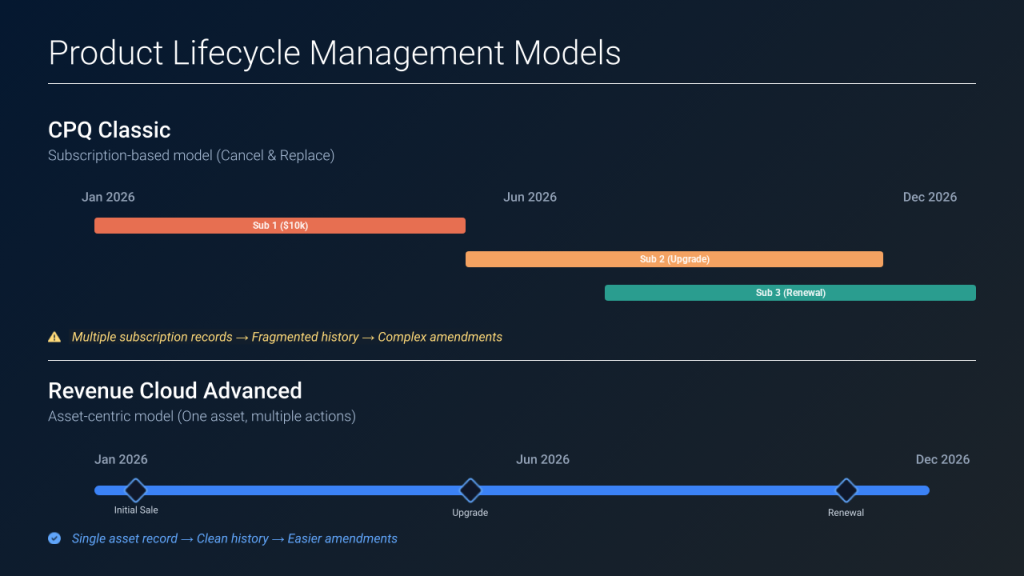
In CPQ, you manage renewals and amendments through a contract-and-subscription model. Let’s say a customer buys a software license for $10,000/year on January 1st, 2026. You create:
- One Subscription record with quantity = 1, start date = 1/1/26, end date = 12/31/26
Six months later, the customer wants to upgrade. In CPQ, here’s what typically happens:
- You create an amendment quote
- You cancel the existing subscription
- You create a new subscription for the upgraded product at a new price
- You now have two subscription records in your history – the old one (terminated) and the new one (active)
In Revenue Cloud Advanced, it’s completely different. You have:
- One Asset record representing that product sold to that customer
- Multiple Asset Actions representing what happened to that asset over time
The customer’s upgrade is an Asset Action, not a cancellation and replacement. The amendment is tracked in the Asset Action history. Renewals, downgrades, amendments, terminations – each is an Asset Action with its own Asset State Period. When your finance team or sales ops team looks at what happened with that customer over the year, they see a complete timeline, not a mess of overlapping records.
This changes how you think about:
- Renewals (no more cancel-and-replace complexity)
- Amendments (you can now extend a contract term without re-quoting)
- Revenue tracking (one asset, multiple revenue events)
- Customer history (a clean timeline of what was sold and changed)
For migration architects, this is critical to understand because it’s not just a data mapping exercise. It’s a conceptual shift in how you manage the product lifecycle for your customers.
Technical Architecture: Products, Pricing, and Attributes
Here’s another area where architects need to shift thinking. In CPQ, products are straightforward: you have a Product2 record, you attach it to Price Books, you create Price Rules for specific customers or conditions, and you manage Options and bundle rules through complex Product Rule configurations.
In Revenue Cloud Advanced, the approach to products is metadata-driven, and it’s more powerful but requires different thinking.
Products in RCA: Metadata-First
Instead of creating a separate Product2 record for every variation (like a “Software License – Enterprise – Annual” product), RCA uses Attributes. An Attribute is a metadata definition of a product characteristic that can be applied to many products at once.
Example: You sell cloud software with different editions. Instead of creating separate products for each edition, you:
- Define an Attribute called “Edition” with values: Starter, Professional, Enterprise
- Define another Attribute called “Billing Period” with values: Monthly, Annual
- Define another Attribute called “Users” as a number field
Now you create one Product record, and you can configure it with any combination of these attributes. The same Product can be quoted with Starter edition + Monthly OR Enterprise edition + Annual. RCA’s configurator handles this dynamically.
This dramatically simplifies your product catalog. A CPQ implementation with 500 products might become 50 products in RCA with attributes doing the differentiation. For organizations with massive catalogs, this is a game-changer. For your migration, it means you’ll need to rationalize your product hierarchy during the planning phase.
Pricing in RCA: Dynamic and Declarative
CPQ pricing is rules-based. You create Product Rules, Price Rules, and if those don’t work, you write Apex code. The system is powerful but requires a developer touch for anything non-standard.
RCA pricing is both more declarative and more capable. You define pricing through Pricing Procedures, which are visual configurations that don’t require coding. You can model:
- Base pricing (from price book)
- Discounts (percentage, fixed amount, tiered)
- Surcharges
- Currency conversions
- Usage-based pricing (tokens sold and consumed)
- CPI-based annual adjustments (new in Winter ’26)
And here’s the thing – these pricing procedures chain together. You can have the pricing flow through a series of steps, each modifying the price, and it all happens in a declarative model that admins can maintain without developers.
Winter ’26 introduced Formula Elements with multiple output formulas, which further reduces the need for custom calculations. Complex pricing that required Apex in CPQ can now be configured visually.
For architects, this is both an opportunity and a challenge. Opportunity because you can likely remove a lot of custom code. Challenge because you need to audit every custom pricing calculation in your CPQ implementation and figure out how to replicate it (or replace it) in RCA’s declarative model.
The Configurator: From Rules to Constraints
CPQ has a configurator, but it’s rules-based. You define Product Rules with logic like: “If the customer selects Feature A, they must also select Feature B” or “If they select Feature C, they can’t select Feature D.” These work, but they’re hard to maintain at scale, especially with large product hierarchies.
Revenue Cloud Advanced has an Advanced Configurator with a Constraint Model approach. Instead of writing rules one by one, you define constraints based on the data itself. You can use object data as the basis for constraints – supporting up to 50,000 rows of rules with object data, compared to the limitations of text-based rules in CPQ.
The constraint model is also more visual. Admins can work with constraint models directly alongside product definitions, making the relationship between product configuration and business rules clearer.
For migration, this means your existing CPQ Product Rules need to be evaluated and potentially rebuilt. Winter ’26 added a conversion tool that can help translate some rules into constraints, but complex custom logic may need to be completely rethought.
The Hard Part: Migration Challenges and Reality Checks
We want to be honest about what you’re up against, because we’ve seen too many architects underestimate these challenges.
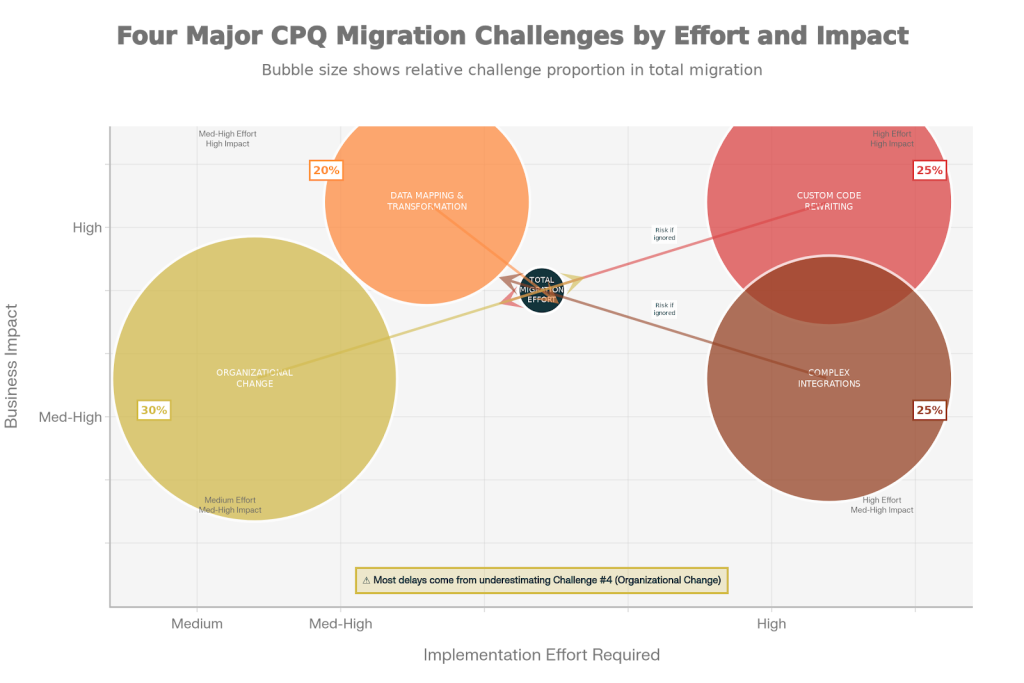
Challenge #1: Custom Code Rewriting
Most mature CPQ implementations have custom Apex code. Maybe you’ve written custom validation on quotes. Maybe you have an Apex trigger that calculates special discounts based on customer history. Maybe you built a Visualforce page to handle a specific quoting flow that CPQ’s standard UI doesn’t support.
Here’s the truth: most of this code won’t port cleanly to RCA. The object model is different (Quote instead of SBQQ__Quote__c, for example), the APIs have changed, and the underlying logic often needs to be fundamentally reconsidered because RCA does things differently than CPQ.
Our typical experience is that 20-30% of custom code can be migrated with updates, but 50-70% needs to be rewritten or replaced entirely. The good news is that much of what you built custom in CPQ can now be done declaratively in RCA using Flows, the Advanced Configurator, or Salesforce Pricing Procedures. But that requires architects and developers who understand both systems deeply.
This is often the biggest cost factor in migration that organizations underestimate. Budget time for a complete code audit and replacement planning.
Challenge #2: Data Mapping and Transformation
Your historical quote data needs to move to RCA, and it’s not a 1:1 mapping.
Let’s say you have 10,000 quotes from the past two years in CPQ that you want to preserve for reporting and history. Each quote has:
- Quote header (SBQQ__Quote__c) with fields like discount, customer payment terms, special notes
- Multiple quote lines (SBQQ__QuoteLine__c) with product configurations
- Price rules that were applied
- Approval history
When you move this to RCA:
- The quote header maps to the native Quote object, but some custom fields may not exist
- Quote lines map to Quote Line Item, but the field names are different
- Price rules don’t have a direct equivalent – you might keep them as records for reference, but the active pricing is gone
- Approval history needs to be preserved for audit purposes but may not be queryable in the same way
The data cleansing work is significant. You’ll need to:
- Identify which historical quotes actually matter for reporting (do you need 10 years of data?)
- Map custom fields and decide what happens if the target field doesn’t exist
- Validate currency values, dates, and calculations
- Create a tolerance for what doesn’t map perfectly (usually around 2-5% of data needs manual intervention)
Rule of thumb: budget 2-4 weeks for a thorough data cleansing and mapping exercise before you even start the technical migration.
Challenge #3: Complex Integrations Need Rebuilding
Your CPQ doesn’t exist in isolation. It probably integrates with:
- An ERP system (NetSuite, SAP, whatever) for order fulfillment
- A billing system (Zuora, Aria, custom solutions) for invoicing
- A contract lifecycle management (CLM) system for document generation
- Your accounting system for revenue recognition
- Maybe a revenue management system
All of these integrations are built to CPQ’s object model and APIs. When you move to RCA, those integrations often break because:
- The object structure is different (Quote vs. native Quote)
- The APIs are different (RCA has a headless API-first approach)
- Field names and values may have changed
- Data flow patterns are often different
You’ll need to audit every integration and rebuild the ones that are critical. For deep ERP integrations, this can take months. For simpler billing integrations, it might be 2-4 weeks of work.
Challenge #4: Organizational Change is Underestimated
Technical migration is one thing. Organizational migration is another. Your sales team has learned how to quote in CPQ. They know where fields are, how to add products, how to apply discounts. Revenue Cloud has a different UI, different flows, different naming conventions.
Similarly, your revenue operations team knows how to maintain CPQ – they know how to create price rules, manage product hierarchies, handle approvals. RCA pricing procedures, context definitions, and asset actions are conceptually different.
The training, change management, and user adoption effort is often the biggest delay factor. I’d estimate 4-6 weeks of dedicated effort for user training and support, with ongoing optimization work for 2-3 months post-go-live.
Migration Strategies: Which Approach Fits Your Reality?
There are essentially three ways to approach a CPQ to RCA migration. The right choice depends on your organization’s tolerance for risk, your technical capacity, and your business priorities.
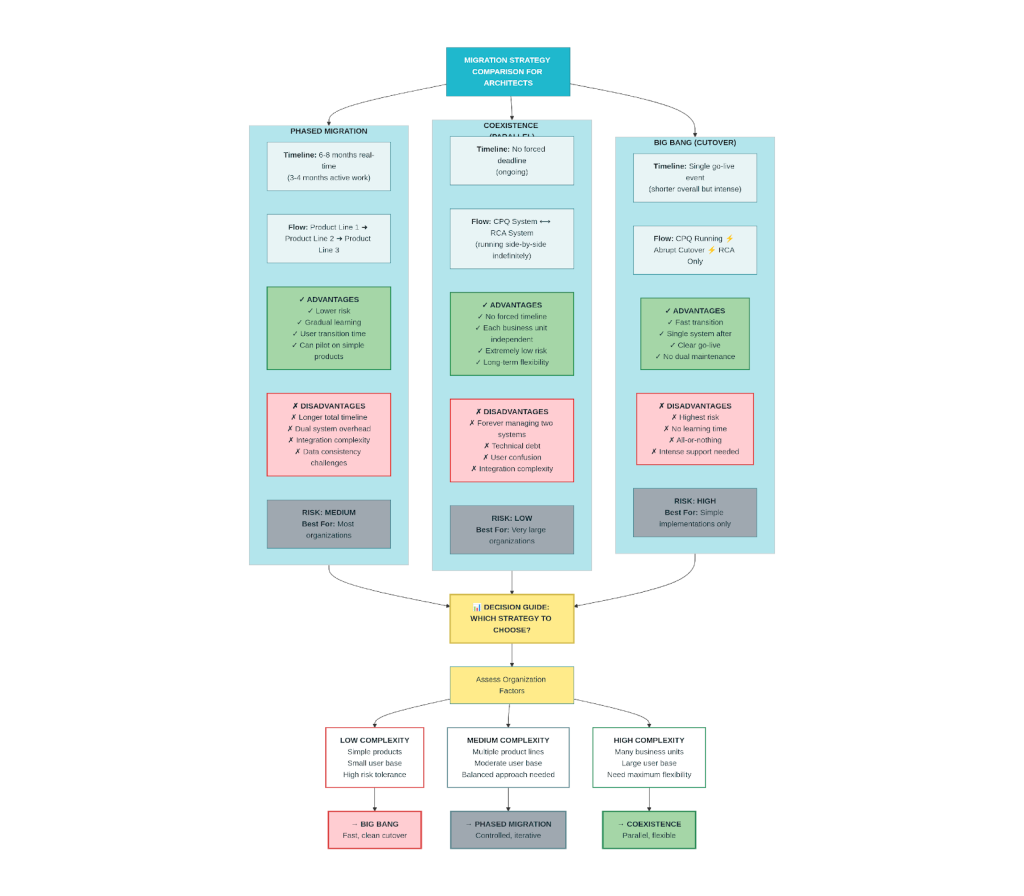
Strategy #1: Phased Migration (Most Common)
Run CPQ and RCA in parallel for a defined period (typically 3-6 months). You migrate one product family or business unit at a time to RCA while keeping CPQ live for the rest of the business.
Advantages:
- Lower risk (if something breaks in RCA, CPQ is still running)
- Time to learn RCA while still supporting the business
- Users can transition gradually
- You can pilot the migration on your lower-complexity products
Disadvantages:
- Higher operational overhead (maintaining two systems)
- Risk of data inconsistency between systems
- Longer total timeline
- Integration work needed for both systems
Best for: Most mid-market and enterprise organizations
Strategy #2: Coexistence (Underutilized Option)
This is interesting because most people don’t realize it’s possible: you can have CPQ and RCA running in the same Salesforce organization indefinitely, serving different parts of the business.
CPQ uses custom Quote objects (SBQQ__Quote__c). RCA uses the native Quote object. These don’t conflict. You could run CPQ for your legacy product lines and RCA for your new subscription business, and they’d operate independently.
Advantages:
- No forced migration timeline
- Different business units can adopt at their own pace
- Extremely low risk
Disadvantages:
- Forever managing two systems (technical debt)
- Integration complexity (two quoting engines)
- User confusion about which system to use
Best for: Very large organizations with distinctly different business lines, or as a long-term bridge strategy
Strategy #3: Big Bang (Highest Risk, Sometimes Necessary)
Cut over completely in a single go. Plan heavily, execute carefully, and move everything to RCA at once.
Advantages:
- Fast transition (no months of dual-system overhead)
- Single system to maintain afterward
- Clear, defined go-live
Disadvantages:
- If something breaks, it’s broken for everyone
- No room for learning or iteration
- Requires extremely thorough pre-go-live testing
- High stress on support team
Best for: Organizations with relatively simple CPQ implementations, or those with regulatory urgency
The Data Migration Process: Step by Step
If you’re going to migrate successfully, this is the process architects should enforce:
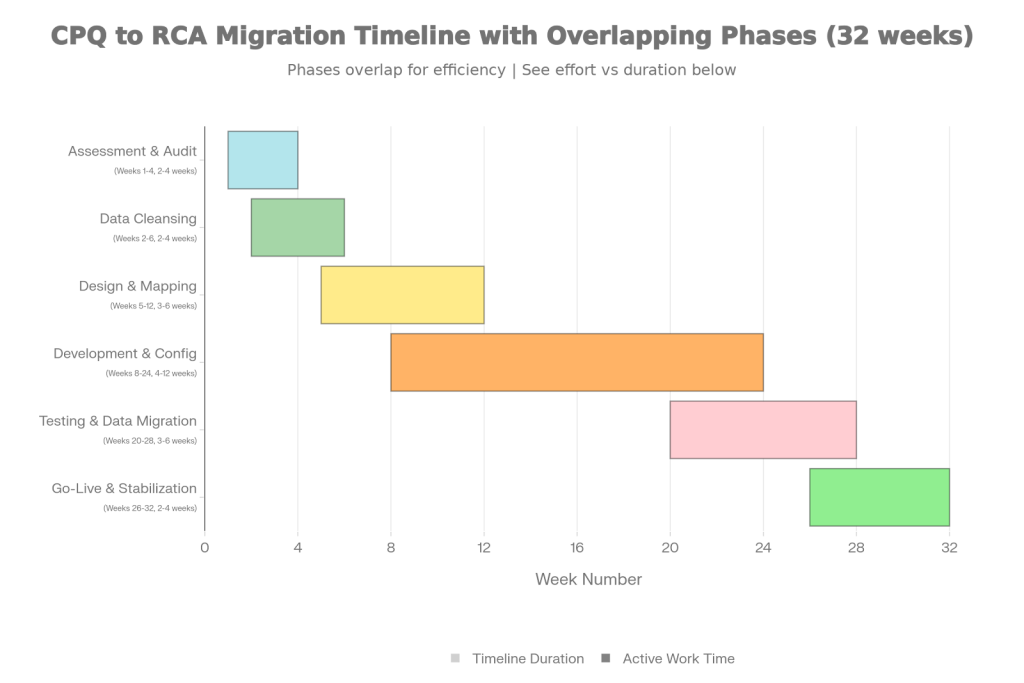
Phase 1: Assessment and Audit (2-4 weeks)
Before any data moves, you need to understand what you have:
- Document your current CPQ configuration (products, pricing rules, custom code, integrations)
- Audit your quote data – how much is actively used? How much is archive?
- Identify custom objects, custom fields, and custom logic
- Map dependencies (which systems feed into CPQ? Which consume CPQ data?)
- Build a data quality scorecard (identify bad data while you’re still in CPQ)
The output here is a detailed assessment document that becomes your blueprint for the migration.
Phase 2: Data Cleansing (2-4 weeks, can overlap with Phase 1)
Using your assessment, clean your data:
- Identify and remove duplicate product records
- Validate pricing data (do all prices make sense?)
- Clean up quote data (archive old quotes, fix corrupted records)
- Standardize naming conventions
- Ensure all users, accounts, and currency values are valid
This is unglamorous work, but it’s absolutely critical. You don’t want bad data following you to RCA.
Phase 3: Design and Mapping (3-6 weeks)
Now design your RCA configuration:
- Map CPQ Quote fields to native Quote fields (not 1:1 – think about what actually matters)
- Map Quote Line fields to Quote Line Item fields (you’ll use context definitions here)
- Design your product hierarchy and attributes
- Design your pricing procedures
- Design your asset management approach
- Document all custom code and decide: migrate, replace, or retire?
This phase produces a detailed design document and a field mapping spreadsheet that’ll guide your technical team.
Phase 4: Development and Configuration (4-12 weeks depending on complexity)
- Build your RCA product catalog
- Configure pricing procedures
- Rebuild or redesign custom functionality in Flows or declarative features
- Configure approvals
- Set up your asset management
- Create context definitions and field mappings
Parallel to this:
- Rebuild critical integrations
- Test APIs with external systems
- Configure billing workflows
- Set up revenue recognition
Phase 5: Testing and Data Migration (3-6 weeks)
- Create a sandbox with production data
- Perform data migration to sandbox
- Run user acceptance testing (UAT)
- Validate all integrations
- Test approval processes
- Verify billing and revenue recognition accuracy
This is where you find the problems you didn’t anticipate. Budget time for fixes and re-testing.
Phase 6: Go-Live and Stabilization (2-4 weeks)
- Perform final production data load
- Monitor closely during first day/week
- Be prepared with support resources
- Address issues that surface with real users
- Begin optimization work
The Quote-to-Cash Pipeline: How RCA Fixes It?
One of the most compelling reasons to migrate is the transformation of your quote-to-cash pipeline. This is where architects need to help their organizations understand the real value.
In CPQ, your pipeline is fragmented. A quote created in CPQ becomes a contract somewhere else, which spawns subscriptions, which don’t automatically feed billing, which requires manual reconciliation with revenue recognition systems. Multiple systems, multiple handoffs, multiple opportunities for data to diverge.
In RCA, the pipeline is unified. A quote flows directly to an order, to assets, to billing, to revenue recognition – all within the same data model. There’s no re-entry of data, no reconciliation work, no compliance gaps. The result is faster cycles (30-40% reduction in quote-to-close time), fewer errors (0.1% error rate vs CPQ’s 2-5%), and automatic compliance with ASC 606 and IFRS 15.
For your sales team, this means deals move faster. For your finance team, it means accurate revenue recognition with minimal audit risk. For your RevOps team, it means less reconciliation work and more time on strategy.
Winter ’26: Features Architects Should Understand
If you’re planning a migration now or soon, you need to know what RCA looks like in late 2025. Winter ’26 brought significant enhancements that should influence your architecture decisions:
- Quote Deep Clone: Users can now clone an entire quote – lines, groups, all of it – with one click. This is huge for sales teams handling similar deals. For architects, it means you need to think about what gets cloned (approvals? Historical pricing? custom fields?) and set expectations.
- Ramp Deals for Groups: Previously a pain point, you can now create multi-year deals with different products and pricing in each year-long segment. This was a major request from subscription and SaaS businesses. If your business models around multi-year contracts with different products per year, this is a game-changer.
- CSV Import for Quote Lines: You can now import quote line configurations from CSV. This is a pragmatic feature for organizations that have complex pricing in spreadsheets and aren’t ready to fully move that logic to RCA. It’s a bridge capability, not a long-term strategy, but it eases migration for complex pricing situations.
- Asset Amendment Enhancements: You can now extend asset terms without cancel-and-replace, apply price-only amendments, and handle CPI-based annual price adjustments automatically. This addresses what was probably the #1 complaint about CPQ’s renewal flow.
- Constraint Model Improvements: Direct editing from product records, conversion tools for existing rules, and support for larger rule sets (50,000 rows of object data). If you have complex product configurations, these improvements mean RCA’s configurator is finally at feature parity with CPQ.
- Approval Preview and Smart Submissions: Users can see what approval chain they’re submitting to before they submit, and they can resubmit without restarting the entire process. Operational friction gone.
- Salesforce Go for Revenue Cloud: This is huge for implementation efficiency. It’s an automated setup wizard that handles all the foundational RCA setup in one flow (vs. manually enabling Revenue Cloud, creating pricing procedures, extending contexts, etc.). For new implementations or migrations, this saves 30-60 minutes of manual setup per environment. If you’re building in a sandbox or new org, use it.
For architects evaluating RCA right now, Winter ’26 means the platform is genuinely mature. Features that were “nice to have” two releases ago are now standard capabilities.
What’s Coming in 2026: The Roadmap Signals
While Salesforce doesn’t confirm product roadmaps far in advance, based on recent releases and public statements, here are the areas to watch in 2026:
- Agentforce Revenue Management: This is the bigger story. Salesforce’s AI agents are coming deeper into Revenue Cloud. Imagine quote generation guided by AI, pricing recommendations based on historical win/loss data, and contract review with AI-suggested edits. This is coming. If your organization is building custom quoting workflows today, consider whether AI-assisted workflows make sense for your 2026 strategy.
- Usage-Based Billing Maturation: The platform added usage management in Spring ’25 and it’s been enhanced since. This will continue to evolve. If you’re billing on consumption (whether tokens, API calls, data usage, or actual product consumption), RCA’s approach will keep improving.
- Multi-Currency and Multi-Entity Enhancements: Global organizations have been asking for better support for complex currency and entity scenarios. Expect improvements here.
- Advanced Analytics and Predictive Insights: Revenue Cloud already integrates with Tableau, but expect deeper predictive capabilities around deal health, churn risk, and optimal pricing.
- For architects, the big-picture signal is clear: RCA is becoming the revenue operations backbone of Salesforce. It’s not a quoting tool anymore – it’s a complete revenue management platform that’s getting deeper AI integration, better analytics, and more automation. Plan your architecture with that trajectory in mind.
Best Practices for Architects: What We’ve Learned
After watching dozens of migrations, here are the practices that separate successful projects from painful ones:
1. Start with business process mapping, not data mapping.
Too many architects jump to “how do we move the data?” before understanding “what are we actually trying to accomplish?” Take time to map out your full quote-to-cash process in RCA terms. Often, you’ll realize you can simplify processes that were complex in CPQ. Don’t just lift-and-shift your CPQ workflows into RCA – redesign them.
2. Treat product hierarchy rationalization as a separate workstream.
In CPQ, you might have 500 products. In RCA with attributes, you might have 50 products with many attribute combinations. But this isn’t a technical conversion – it’s a business decision. Engage your product and revenue ops teams early. This work alone can save months of configuration and maintenance down the line.
3. Build governance before you build the system.
Who owns the product catalog? Who can create pricing procedures? Who approves changes? In CPQ, these governance structures often evolved ad-hoc. With RCA, establish clear data ownership and change control from day one. It pays off during migrations and afterward.
4. Plan for integration rewrites as separate projects.
Don’t treat integrations as an afterthought. If you have an ERP integration, that’s a real project with its own timeline and dependencies. Break it out, estimate it seriously, and schedule it as a dependent workstream of your migration.
5. Invest heavily in testing and validation.
The most commonly overlooked phase is testing. You’ll find issues you didn’t anticipate. Build in time for discovery, fixes, and re-testing. And validate not just functionality, but data accuracy, compliance (ASC 606 revenue recognition), and integrations with real data.
6. Use Salesforce Go for new sandbox environments.
If you’re building a new sandbox for your migration work, use Salesforce Go to set up the foundational RCA configuration. It’s fast, it’s correct, and it eliminates 30-60 minutes of manual setup busywork.
7. Plan for change management as seriously as technical implementation.
Your finance team’s month-end close process needs to change. Your sales ops team’s pricing maintenance approach needs to change. Your sales team’s quoting workflow changes. Give this real time and resources, or technical implementation will be perfect and adoption will be painful.
8. Consider running a pilot on one product line or business unit first.
If you’re large enough to segment, do it. Migrating your most complex product first is a mistake – start with something simpler, learn, then tackle complexity. A three-month pilot with one product line that sells 10-15% of your revenue is a reasonable investment in de-risking the full migration.
The Timeline Reality Check
We’ve mentioned timeframes throughout this, but let me be explicit about what typical organizations should expect:
Small organizations (under $10M revenue, simple pricing, <20 quote lines per month): 2-3 months of active work, spread over 4-5 months real-time due to testing and waiting for approvals.
Mid-market (under $100M revenue, moderate complexity): 3-4 months of active work, spread over 6-8 months real-time. This assumes you have dedicated people and the complexity is manageable.
Enterprise (large, complex, multiple product lines, global): 6+ months of active work, spread over 12+ months real-time. You’re likely doing a phased rollout, and each phase takes time.
The biggest variable is custom code. If you’re heavy on custom Apex, you’re adding 4-6 weeks minimum for code audit and rewrite. If you’re light on customization, you save that time.
Those are optimistic timelines assuming you have the right resources available and dependencies are managed. In reality, most projects run 20-30% longer due to discovery, scope changes, and integration challenges.
Conclusion: The Migration Is Real Work, But It’s Worth It
We want to be honest in closing: CPQ to RCA migration is a significant undertaking. It’s not a simple upgrade. You’ll deal with custom code rewrites, integration challenges, data transformation complexity, and organizational change. And it’ll take real time and resources.
But here’s why it’s worth doing, especially now:
The subscription economy, the complexity of modern pricing models, and the compliance demands of today’s business environment are pushing organizations toward integrated revenue operations. CPQ was designed for a different era – transaction-based sales with simple pricing and separate billing. RCA is designed for how companies actually operate now.
When you go through this migration thoughtfully – when you design your product hierarchy, rationalize your pricing, rebuild your integrations, and train your team – you come out the other side with a revenue operations platform that’s modern, scalable, and capable of supporting whatever your business evolves into next.
The work is substantial. But the payoff – faster deals, better pricing discipline, accurate revenue recognition, integrated systems, and reduced operational leakage – makes the effort real and valuable.
Start with assessment. Plan honestly. Execute rigorously. Your future self will thank you.
Ready to Plan Your CPQ to RCA Migration?
Migration from CPQ to Revenue Cloud Advanced is complex, but you don’t have to navigate it alone.
At 2Creative Solutions, we’ve guided enterprises through this transformation.
Whether you’re in the assessment phase or ready to execute, let’s talk about your migration strategy.
Get Expert Guidance
Book a 1-on-1 Consultation: https://2creative.ca/
Learn More & Stay Updated
Watch Our Video Tutorials: https://www.youtube.com/@2CreativeSolutions/
Connect on LinkedIn: https://ca.linkedin.com/company/2cretiv
The migration journey is real work, but the payoff is worth every effort.
We’re here to help you get there.


