
Integration Procedures (IP) in Salesforce OmniStudio, a try-catch block is used to handle exceptions or errors that might occur during the execution of an integration procedure.
tryblock: This section of the code contains the operations or actions you want to perform. If any error occurs during these operations, the execution will jump to the correspondingcatchblock.catchblock: If an error occurs in thetryblock, thecatchblock catches the exception and allows you to handle it gracefully. This could involve logging the error, sending a message, or performing any other necessary actions without stopping the entire process.
Example of Usage:
In an IP, the try-catch block isn’t part of the declarative configuration but can be used in scripts or custom logic via Apex actions or within DataRaptors if the logic allows for exception handling. Lets create try-catch block in IP.
Here, I am using Datamapper for extracting contact details using Id. We will add failure execution formula, which means if condition is failed in execution formula, In that case catch block will executed.
- Create a new IP and drag try-catch block into elements from available components.

Now drag the extract datamapper into try-catch block.
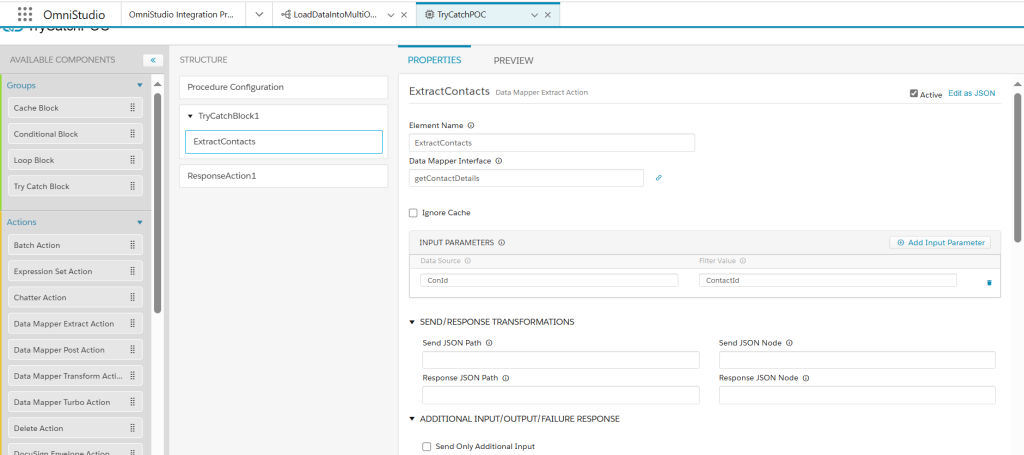
Now, Suppose we want to add condition for data raptor extract and if that condition fail then it will display error message from catch.
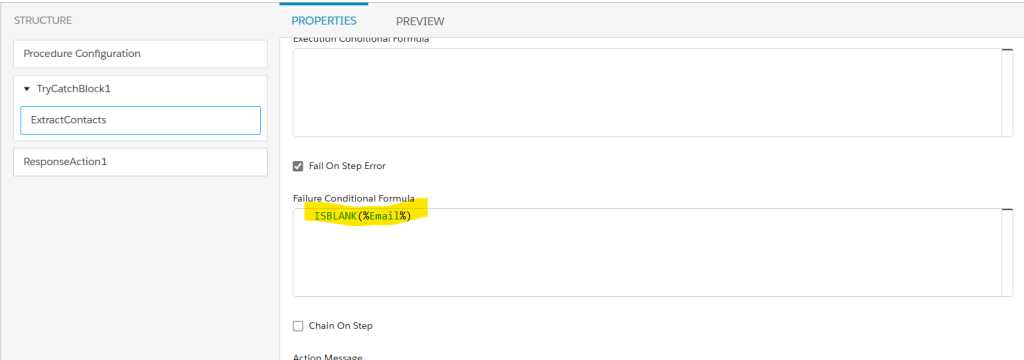
Now, If above formula is failed then it will go to try catch, see below screenshot for failure message.

Drag Response action that would contain our Datamapper output.

Now, preview the IP and pass correct contact Id for success of datamapper.

Now, pass incorrect contact Id or whatever input that makes true the failure execution formula for testing catch block on failure.Below is screenshot of failure message.

In above scenario, I passed empty contact Id which fails the formula and enters into catch block.
This approach ensures that your Integration Procedures are more resilient, reliable, and user-friendly, even when facing unexpected issues during execution.


