
Pricing management in Salesforce is the backbone of every sales operation. It’s where strategy meets execution – the intersection between what your company charges and how accurately that price reflects your value, accounts for costs, and drives profitability. Get it right, and you’re controlling margins, accelerating deal velocity, and building scalable revenue operations. Get it wrong, and you’re either leaving money on the table or dealing with constant billing disputes and manual interventions that slow everything down.
The challenge isn’t implementing a price book. Any Salesforce org has one of those out of the box. The real complexity emerges when you need to handle fractional pricing for telecom customers, price products based on hundreds of configurable attributes, apply volume discounts that vary by customer segment, ensure multi-currency accuracy across global sales teams, and eventually pass all that pricing data to billing and finance systems that need it to be exact.
This guide walks through the full landscape of Salesforce pricing management – from foundational concepts that anyone managing pricing should understand, through advanced mechanisms that separate basic implementations from sophisticated revenue operations, all the way to real-world configurations that handle scenarios that would otherwise require spreadsheets and manual overrides.
The Pricing Management Foundation: How Price Books Work
Everything in Salesforce pricing starts with price books. Not because they’re complicated, but because they’re fundamental. A price book in Salesforce is essentially a list of products and their prices. That’s it at the surface. But the architecture beneath that simplicity matters.
Standard Price Book vs. Custom Price Books
When you create a Salesforce org, you get a Standard Price Book automatically. This is the master list – every product in your org must have an entry here. The Standard Price Book entry for a product contains what Salesforce calls the “list price,” which serves as the baseline for all pricing logic downstream.
Custom Price Books layer on top of this foundation. They let you define different pricing for different market segments, sales channels, or customer tiers without duplicating your product catalog. For example, you might have one price book for direct enterprise sales, another for partners (which might include partner markups or smaller margins), and a third for a specific geography where local pricing regulations require different rates.
The key insight: a product must have an active entry in the Standard Price Book before it can appear in any custom price book. And once you’ve selected a price book on an opportunity or quote, Salesforce pulls prices from that specific book. The sales rep can still apply additional discounts, but the starting point – the list price – comes from the selected price book.
Understanding Price Book Entries
A Price Book Entry is the record that connects a Product to a Price Book and assigns a price to it within that specific book. When you create one, you’re defining:
- Which Product this entry represents
- Which Price Book this entry belongs to
- The Unit Price (the per-unit cost)
- The Product Selling Model (for subscription products, this becomes important later)
The unit price field in a Price Book Entry defaults to 2 decimal places – standard currency precision. But if your business model requires fractional pricing (like telecom billing at $0.0020 per megabyte, or SaaS platform pricing at $0.33333 per compute credit), you’ll need to enable Salesforce’s “More Decimals on Price” feature, which we’ll cover in depth later.
Once a Price Book Entry is created and active, sales reps can add products from that price book to opportunities and quotes. The system will automatically pull the price from the Price Book Entry, making it the baseline for all discount and margin calculations that follow.
Core Pricing Mechanisms: Rules, Adjustments, and Discounts
With price books as your foundation, the next layer is how prices actually change – the mechanisms that let you apply business logic to take the list price and arrive at the final customer price.
Discount Schedules: Volume-Based and Tiered Pricing
Discount Schedules are one of the most common pricing mechanisms in Salesforce. They define discounts based on quantity tiers. Here’s how they work in practice:
Your company sells software licenses. The list price is $100 per license. But you want to offer volume discounts:
- 1-10 licenses: full price ($100)
- 11-50 licenses: 5% discount
- 51-100 licenses: 10% discount
- 100+: 15% discount
You create a Discount Schedule with four tiers, each specifying a quantity range and a discount percentage. Then you attach this schedule to your product. When a sales rep adds this product to a quote and enters a quantity of 75, the quoting engine automatically applies the 10% discount because 75 falls in the 51-100 range.
Discount Schedules can be applied in multiple ways:
- Percentage Discount: A percentage off the list price (e.g., 10% discount = pay 90% of list)
- Fixed Amount Discount: A dollar amount off (e.g., $15 off per unit)
- Hard Price: Set a specific price point for that tier (regardless of list price)
They can also be scoped to the entire quote or to individual quote lines, and they support different aggregation methods – you can calculate discounts based on total quote quantity or by individual line item quantity.
Price Rules: Conditional Pricing Logic
Price Rules take discount scheduling further by adding conditional logic. A Discount Schedule says “if quantity is between X and Y, apply Z discount.” Price Rules let you layer conditions on top of that: “if quantity is between X and Y AND the customer is in segment ‘Enterprise’ AND the opportunity originated from a partner channel, then apply Z discount.”
This is where you start enforcing business logic instead of just applying flat discounts. You can create rules that:
- Vary discounts by customer type or industry
- Apply different discount caps for different sales channels
- Provide education discounts or non-profit pricing
- Enforce minimum pricing floors so reps can’t accidentally undercut your margins
- Combine multiple discount types (volume discount + channel discount + customer loyalty)
Price Rules also integrate with approval workflows, which we’ll cover later. A rule might specify that any discount above a certain threshold requires manager approval.
Price Adjustments: Beyond Standard Discounts
Price Adjustments in Salesforce Industries (Vlocity) go further – they let you apply rules-driven adjustments that consider product attributes, customer context, and complex business logic.
There are several types of price adjustments:
- Flat Adjustments: A fixed dollar amount (e.g., add $50)
- Percentage Adjustments: Multiply the current price by a percentage (e.g., apply a 12% uplift)
- Attribute-Based Adjustments: Adjust price based on product configuration (if a customer selects “premium support,” add $500 to the price)
- Volume-Based Adjustments: Tiered adjustments similar to discount schedules, but for increases as well as decreases
Each adjustment lives in what Salesforce calls a “Price Adjustment Schedule” with multiple “Price Adjustment Tiers.” You define the tier (what condition applies), the type of adjustment (amount or percentage), and the value. Then you map this to a product so the pricing engine applies it during quote generation.
Qualification Rules: Controlling When Adjustments Apply
Qualification Rules are Salesforce Industries’ way of adding guardrails around pricing adjustments. A Qualification Rule answers the question: “When is it okay to apply this adjustment?”
You might have a rule that says: “Allow a manual pricing adjustment of up to 15% for Platinum SLA accounts, but only 10% for Silver SLA accounts.” Or: “Manual pricing adjustments are only allowed through our internal sales team, not through partner portals.”
These rules evaluate context – data from the account, opportunity, quote, or order – and determine whether a pricing adjustment is allowed and under what constraints. If a sales rep tries to apply an adjustment that violates a qualification rule, Salesforce either blocks it outright or routes it to an approval workflow.
The Quote Line: Where Pricing Actually Happens
All those pricing mechanisms (discount schedules, price rules, adjustments) converge at the Quote Line Item level. A quote line is a single product on a quote, and it’s where Salesforce calculates the actual price the customer will pay.
Quote Line Item Pricing Fields
When a quote line is created, Salesforce calculates and populates several pricing fields:
- List Unit Price: The list price from the selected Price Book Entry – the baseline
- Regular Unit Price: The price after any volume discounts or special pricing tiers are applied
- Sales Price (or Special Price): The final price after all discounts, adjustments, and rules are applied
- Total Amount: The Sales Price multiplied by Quantity
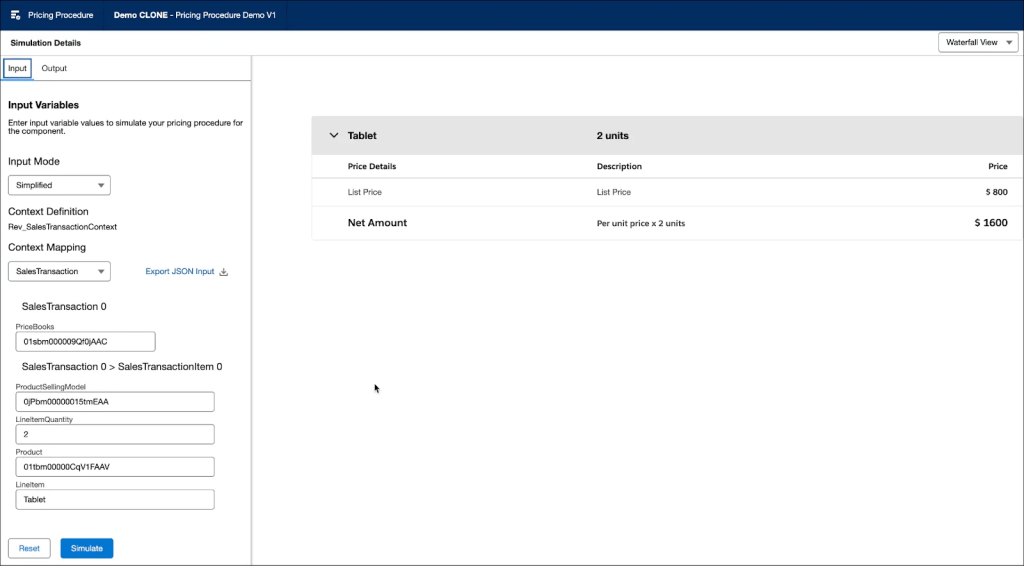
Each of these fields flows through a calculation waterfall. And here’s what matters for operations: if any pricing rule fails or produces an unexpected result, you need visibility into which rule caused the issue and how the price was calculated.
The Price Waterfall: Transparent Pricing Calculations
The Price Waterfall is a feature that logs each step of the pricing calculation. When a quote line is calculated, Salesforce records:
- Starting list price
- What discount schedules were evaluated
- Which price rules matched (and which didn’t)
- What adjustments were applied
- What the final price is
Sales reps can hover over a price or click an info icon to see the waterfall and understand exactly why a price is what it is. Finance teams can audit it. If a customer disputes why they were charged a certain amount, you can pull the waterfall and explain it step-by-step.
This transparency is crucial when pricing gets complex – especially with attribute-based pricing or multiple overlapping discount rules.
Multi-Currency Pricing: Selling Globally
If your sales teams operate across multiple countries or currencies, multi-currency pricing adds another layer to manage. It’s not just about exchange rates – though those matter. It’s about maintaining pricing strategy consistency while handling currency-specific price books, dated exchange rates, and billing in local currencies.
Setting Up Multi-Currency
Salesforce has two multi-currency options:
Standard Multi-Currency: You enable multiple currencies and set exchange rates. When a sales rep creates a quote in EUR, Salesforce automatically converts it to your corporate currency (USD, for example) using the conversion rate you set. This is simple but static – the conversion rate doesn’t change based on when the deal closes.
Advanced Currency Management (ACM): This option lets you use dated exchange rates. You can say “on this date, 1 EUR = 1.10 USD, and on that date, 1 EUR = 1.12 USD.” When a quote closes on a specific date, the conversion uses the exchange rate from that date. This is critical if you’re reporting under accounting standards like ASC 606 or IFRS, where you need historical accuracy.
Price Books and Currency
Here’s where it gets important: each Price Book has a specific currency. You can’t create one price book with prices in both USD and EUR. Instead, you create separate Price Book Entries for each currency.
This means if you have customers in five countries, you need price book entries in those five currencies for every product you sell. If you have 500 products, that’s 2,500 price book entries to maintain.
Most organizations handle this by:
- Maintaining prices in a spreadsheet with all currencies
- Setting up automated uploads or integrations to sync price book entries
- Using dated formulas to auto-calculate adjusted prices for new currencies
The key consideration: conversion rates for price book entries are not automatic. If you update an exchange rate in Setup, the price book entries don’t recalculate. You need to manually update them or use an automation tool.
Cost Books and Margin Management: Understanding True Profitability
While price books handle customer-facing pricing, cost books track what you actually spend to deliver the product. This separation is fundamental to modern revenue operations.
A Cost Book Entry specifies the actual cost associated with a product. This might include:
- Manufacturing cost for a physical product
- Acquisition cost for a software license
- Infrastructure cost for a SaaS platform
- Materials and labor for a service
Unlike a Price Book (which is mandatory), Cost Books are optional but highly recommended. Without them, you can’t calculate gross margins at the quote level, and your sales teams don’t understand how much profit they’re actually making on each deal.
Setting Up Cost Books
Cost Books follow the same structure as Price Books:
- Create a Cost Book record (e.g., “2024 Standard Costs”)
- Create Cost Book Entries that associate a Product with a Cost
- Optionally set a default cost book in your org
You can create multiple cost books for different scenarios:
- Current year vs. historical costs
- Different cost structures for different business units
- Planned vs. actual costs for forecasting
Once cost books are configured, Salesforce Pricing (the newer pricing engine in Revenue Cloud) can reference them to calculate margins directly on quote lines.
Margin Calculations on Quotes
With both price books and cost books configured, you can set up pricing procedures (we’ll cover those shortly) that calculate:
- Gross Profit: Sales Price minus Cost
- Margin Percentage: (Sales Price – Cost) / Sales Price * 100
This gets populated on the Quote Line and aggregated to the Quote header, giving sales teams immediate visibility into deal profitability.
Why does this matter? It prevents race-to-the-bottom pricing. If a sales rep sees that a deal at a 15% margin is below your company’s profitability threshold, they can adjust either the scope (reduce what they’re selling) or the price before the deal goes to the customer.
Revenue Cloud Advanced and Pricing Procedures: The Modern Approach
Salesforce has been consolidating its revenue management offerings into something called Revenue Cloud Advanced (RCA). It combines CPQ, billing, and revenue recognition into a unified platform. At the heart of RCA is a concept called Pricing Procedures.
What Is a Pricing Procedure?
A Pricing Procedure is a workflow that defines how to calculate a final price. Instead of individual discount schedules and rules scattered around, a procedure is a single, orchestrated sequence of steps that takes all your pricing logic and executes it in order.
A Pricing Procedure might look like:
- Load the product’s list price from the price book
- Apply volume discounts based on quantity
- Check if the customer has a contracted price; if yes, use that
- Apply bundle discounts if this product is part of a bundle
- Apply attribute-based adjustments if the customer selected premium options
- Apply margin floor checks; if the resulting price would create less than 20% margin, set price to minimum acceptable level
- Apply customer-specific discounts (if this is a VIP account)
- Round the price to nearest .05 if required
- Output the final price to the quote line
Each step is a Pricing Element. Salesforce provides standard elements for common scenarios (list price, discount schedules, formula-based pricing, rounding, etc.), but you can also create custom pricing elements using Apex or Flows.
The Price Waterfall in Pricing Procedures
Because Pricing Procedures are structured, they automatically generate a Price Waterfall that shows exactly which step produced which price. This is invaluable for troubleshooting and auditing.
Procedures aren’t mandatory – you can continue using individual discount schedules and rules – but they become essential as your pricing logic grows more complex.
Attribute-Based Pricing: When Products Have Infinite Variations
Some products can’t be priced with simple rules because they have too many variations. A telecom company selling mobile plans might offer:
- Different data allowances (1GB, 10GB, unlimited)
- Different device options (phone, tablet, smartwatch)
- Different contracts (month-to-month, 12-month, 24-month)
- Different add-ons (international roaming, premium support)
A watch retailer might price based on color, size, band material, water resistance rating, and processor power.
Creating a separate product for every combination is impractical. Instead, Salesforce Industries (Vlocity) uses Attribute-Based Pricing.
How Attribute-Based Pricing Works
An Attribute in Salesforce Industries describes a characteristic of a product that influences its price. You define:
- The attribute name (e.g., “Data Allowance,” “Band Material”)
- The possible values (e.g., “1GB,” “10GB,” “Unlimited” for data; “Silicone,” “Leather,” “Metal” for band)
- Whether this attribute is “price-impacting” (meaning it changes the final price)
Then you set up a Calculation Matrix that defines the pricing logic:
| Product | Data Allowance | Device | Contract | Price Adjustment |
| Mobile Plan | 1GB | Phone | Month-to-month | $0 |
| Mobile Plan | 1GB | Phone | 12-month | -$10 |
| Mobile Plan | 10GB | Phone | Month-to-month | +$30 |
| Mobile Plan | 10GB | Phone | 12-month | +$15 |
| Mobile Plan | Unlimited | Phone | 24-month | +$60 |
When a customer configures a product by selecting its attributes, Salesforce looks up the matching row in the matrix and applies the price adjustment. The final price = list price + adjustment.
Complex Pricing with Calculation Procedures
Attributes alone handle simple variations. For more complex logic, you use Calculation Procedures. These are step-by-step workflows (similar to Pricing Procedures, but built specifically for Industries) that can:
- Evaluate multiple attributes simultaneously
- Apply conditional logic (“if data is unlimited AND contract is 24-month, apply X pricing”)
- Reference cost tables for automatic margin calculations
- Chain multiple adjustments together
Calculation Procedures integrate with OmniStudio, Salesforce Industries’ visual configuration platform, so non-developers can build and test them.
Subscription and Usage-Based Pricing: Modern Revenue Models
Traditional pricing – one-time purchases at a fixed price – is becoming less common. Subscriptions, metered billing, and usage-based pricing are increasingly the standard.
Subscription Pricing Mechanics
A subscription product has a start date, a duration (e.g., 12 months), and a billing frequency (e.g., monthly, quarterly, annual). When a subscription is created:
- Salesforce calculates the total contract value
- It divides that across billing periods
- It creates billing records for each period
- Each billing record eventually becomes an invoice
This seems straightforward, but complications emerge:
Mid-cycle changes: If a customer upgrades from a Basic plan to a Premium plan on day 15 of a 30-day month, how much do they pay for the rest of the month? The answer is proration.
Proration ensures customers pay only for what they use. You calculate a proration factor (days remaining / days in month) and apply it to the price difference. For an upgrade, you credit the unused portion of the old plan and charge the prorated portion of the new plan.
Salesforce Billing automates this, but you need to configure it:
- Define proration rules on the product (proration type: daily, monthly, etc.)
- When an amendment is made, Salesforce calculates the proration and creates credit memos and new invoice lines
- The net effect ensures the customer pays the right amount
Usage-Based and Metered Pricing
Usage-based pricing (also called consumption-based) charges customers based on actual usage, not ahead of time. A SaaS platform might charge:
- $0.02 per API call
- $5 per active user per month
- $0.50 per GB of data stored
The business needs to:
- Meter the usage (collect data on how much the customer used)
- Rate the usage (apply the price per unit)
- Aggregate it into usage summaries
- Invoice based on those summaries
Salesforce Billing handles this with Consumption Schedules and Usage Records.
A Consumption Schedule defines how often to meter and bill:
- Billing frequency (monthly, quarterly, etc.)
- How to aggregate usage (all customers together, or by account)
Usage Records capture the actual consumption data. These can be:
- Rated: Salesforce calculates the charge (quantity × unit price)
- Prerated: The customer or a third-party system specifies the charge directly (useful for pass-through costs)
When the billing cycle ends, Salesforce generates a Usage Summary that totals all the rated and prerated records, then includes that on the customer’s invoice.
The challenge: accuracy. Even small per-unit prices compound at scale. If you’re billing $0.0020 per transaction and a customer processes 10 million transactions monthly, that’s $20,000 in charges. Get the metering wrong by 1%, and you’ve lost $200 in revenue – across a customer base, that’s significant.
Approval Workflows and Pricing Governance
Not every sales rep should be able to set any price. Governance is essential – enforcing minimum margins, discount caps, and approval chains.
Approval Rules and Workflows
You configure approval rules in Salesforce that specify when a quote or discount needs approval. For example:
- Any discount greater than 10% requires manager approval
- Any deal below 20% margin requires VP approval
- Any contract with custom pricing requires legal review
When a sales rep creates a quote that violates these rules, the quote is locked into an “Approval Required” state. An automated workflow notifies the approver, they review the deal (hopefully the pricing waterfall provides visibility into why the rep requested that price), and they either approve or reject it.
Approval chains can have multiple steps:
- Sales rep enters discount > 10%
- Quote goes to direct manager for review
- Manager approves or denies
- If approved, but discount is > 20%, it goes to VP for secondary review
- If all approvals clear, quote is unlocked and rep can send to customer
Approval Workflow Best Practices
The most common mistake: too many approval levels. Organizations think “more oversight = better control,” but in practice, slow approvals kill deal velocity. Sales reps work around them by structuring deals differently or going to the wrong approver.
Best practice: Keep approval levels minimal and use clear, rule-based criteria. If a discount is under 9%, the rep’s manager can approve. If it’s 9-20%, the VP approves. Above 20%, it goes to the CFO. Make authority levels clear so reps know exactly who to ask.
Another practice: Set discovery questions on the approval form so approvers understand why the discount was necessary (customer had a competing offer, it was needed to close a strategic account, etc.). This provides context for the decision.
The More Decimals on Price Feature: Solving Fractional Pricing Challenges
Many industries rely on fractional pricing – prices with more precision than the standard two decimal places. This is where the “More Decimals on Price” feature becomes critical.
The Problem Scenario
Imagine a telecom company that charges $0.0020 per megabyte of data. In standard Salesforce:
- You try to enter $0.0020 in a Price Book Entry unit price field
- Salesforce rounds it to $0.00
- A customer using 5,000 MB should be charged $10.00
- Instead, the quote calculates $0.00 × 5,000 = $0.00
- You’ve lost $10 per customer, and at scale, that’s significant revenue leakage
This scenario isn’t hypothetical. It affects telecommunications, utilities, SaaS platforms with metered billing, and manufacturing companies buying raw materials at fractional rates.
Enabling More Decimals on Price
The “More Decimals on Price” feature extends pricing precision from 2 decimal places to 8. This means you can enter:
- $0.00200000 (telecom data per MB)
- $2.54632100 (manufacturing materials per gram)
- $0.33333333 (fractional SaaS credits)
Once enabled, these fields support full 8-decimal precision:
- Price Book Entry: Unit Price field
- Quote Line Item: Sales Price field
- Opportunity Line Item: Sales Price field
- Product custom fields (if created)
Important limitation: The Quantity field still defaults to 2 decimal places. You can price something at $0.12345678 per unit, but you’re entering quantities like 100.00, not 100.12345678. If your business needs high-precision quantities, contact Salesforce Support for a separate feature request.
Enabling More Decimals: Prerequisites and Process
Critical pre-activation checks:
Before requesting this feature, audit every system connected to your Salesforce org:
- ERP Integration: Does your ERP (SAP, Oracle, NetSuite, etc.) accept 8-decimal currency values in its data model?
- Billing System: Can your billing system (Zuora, Stripe, etc.) handle 8-decimal precision?
- Accounting Software: Does your accounting platform (QuickBooks, Xero, etc.) support it?
- Custom Middleware: Any custom integrations or APIs that handle pricing?
Most databases define currency columns as DECIMAL(10,2) – meaning 10 digits total with 2 after the decimal. This format can store values like $999999.99 but can’t store $0.12345678. Before requesting this feature, you need to update all database schemas to DECIMAL(18,8) or similar to accommodate 8-decimal values.
Testing in Sandbox:
Never enable this in production first. Request it in a full-copy or partial-copy sandbox that mirrors production data. Then:
- Create Price Book Entries with extended decimals (e.g., $0.00200000)
- Add products to opportunities and quotes
- Run complete quote-to-cash workflows
- Trigger any Apex code that touches price fields and verify it handles 8 decimals
- Push data through all integrations and confirm they process correctly
Org-Wide Setting:
Important: This is an org-wide setting. You can’t selectively enable it for certain products and not others. Once enabled, every price field in your entire org supports 8 decimals. Products with fractional pricing display as $599.00000000 (trailing zeros), which is technically correct but visually cluttered. This is not a problem functionally, just a display consideration.
The Activation Process:
More Decimals on Price is not a self-service feature – it requires a database schema change that only Salesforce Support can make. Here’s the process:
- Log into your Salesforce Help Portal (
- https://help.salesforce.com
- )
- Click Support, select “Contact Support,” and choose your org
- Create a Case with:
- Category: Feature Activations & Limits
- Product: Sales Cloud or Service Cloud (depending on your org)
- Sub-Category: Pricing Features or Product Configuration
- In the case description, provide:
- Your business need (e.g., “We charge $0.0020 per MB for telecom services”)
- Current issue (e.g., “Prices are rounding to $0.00”)
- Estimated impact (e.g., “$XX,XXX quarterly revenue leakage”)
- Confirmation that you’ve tested in sandbox
- Confirmation that your integrations support 8 decimals
Salesforce typically responds within 1-2 business days and completes activation within 3-5 business days.
Post-Activation Behavior:
After activation:
- You can enter prices like 0.12345678 in Price Book Entry Unit Price fields
- These prices persist exactly as entered – no rounding
- Lightning Experience displays all 8 decimals for any price that has them (even if most are zeros)
- Regular 2-decimal pricing (like $599.00) still works fine and displays as you’d expect
The visual behavior – those trailing zeros – is not wrong, just present. Some teams accept it; others create a custom display component to hide unnecessary zeros. That’s a presentation choice, not a functional requirement.
Common Pricing Implementation Mistakes and How to Avoid Them
After years of Salesforce implementations, certain pricing mistakes recur across organizations. Learning from them can save you months of rework.
Mistake 1: Overcomplicating Product Configuration
The Issue: You try to create 50 discount schedules, 100 price rules, and custom Apex classes all at once. The system becomes hard to maintain, documentation is poor, and nobody remembers why rule #47 exists.
The Solution: Start simple. Create only the pricing rules you actually need right now. Test them thoroughly. Add more rules as you encounter real business needs, not hypothetical ones. Keep product configurations simple and documented.
Mistake 2: Ignoring Legacy Data and Contracts
The Issue: You’re implementing CPQ with existing contracts worth millions in revenue, but you don’t plan how to integrate them. Existing deals stay in spreadsheets while new deals go through the system, creating two sources of truth.
The Solution: Plan legacy data handling in your project kickoff. Decide whether legacy contracts will be migrated into the system or tracked separately. If migrating, do it early. If tracking separately, create a clear process for renewal and amendments – legacy deals can’t stay in spreadsheets forever.
Mistake 3: Inadequate Data Cleanup Before Go-Live
The Issue: Your product catalog has duplicates, pricing is inconsistent across price books, and your currency data is outdated. You go live with this data, and now your reps are confused about which products to use and which prices are current.
The Solution: Invest time in data cleanup before implementation. De-duplicate products, validate price book entries, update currency and exchange rates. Run audits to catch issues. It’s boring work but essential.
Mistake 4: Not Testing Renewals and Amendments
The Issue: You test new quotes thoroughly, but you don’t test what happens when a customer renews their subscription. Or you don’t test mid-contract amendments. Then a customer tries to renew, and the pricing calculates incorrectly because the renewal logic wasn’t configured.
The Solution: Test every scenario: new deals, renewals, amendments with upgrades, amendments with downgrades, plan cancellations. For subscription products, test proration at various mid-cycle points. Don’t just test “happy path” scenarios.
Mistake 5: Ignoring Price Changes Over Time
The Issue: You set up pricing once and assume it’s static. But prices change. Products have end-of-life dates. New pricing models are introduced. Competitors adjust their pricing. Your pricing system reflects a point-in-time snapshot, not the reality of ongoing pricing evolution.
The Solution: Build a plan for pricing updates into your governance model. Decide how frequently price books are updated, who owns that process, how old pricing is archived, and how historical pricing is tracked for revenue recognition purposes. Implement this process before go-live, not after.
Mistake 6: Poor Integration Planning
The Issue: You enable More Decimals on Price, but your ERP can’t handle 8-decimal values. Data flows from Salesforce to the ERP, and the integration breaks. Or you implement multi-currency pricing without verifying that your billing system handles currency-specific price books.
The Solution: Before enabling any advanced pricing feature, audit integrations. Verify database schemas, API limitations, and data format requirements. Test in sandbox environments that mirror your production integrations, not just toy environments. Integration issues often catch edge cases that functional testing misses.
Practical Pricing Strategy: Aligning Technology with Business Goals
Technology enables pricing strategy, but it doesn’t create one. Here are some principles that separate mediocre pricing implementations from excellent ones.
Principle 1: Pricing Should Be Transparent
Your sales team should understand why a price is what it is. The Price Waterfall helps with this, but so does clear documentation. Document your discount policies, approval criteria, and pricing rules in plain language. When a rep has a question, they should be able to find an answer without escalating to the VP of Sales.
Principle 2: Margins Matter More Than Volume
It’s tempting to chase every deal with aggressive discounting. Cutting prices by 20% to win a customer feels like a “win.” But if that deal is already at a thin 12% margin, and discounting takes it to 9.6%, you’ve just made the deal less profitable. Build visibility into margins at the quote line, and make reps accountable for profitability, not just volume.
Principle 3: Pricing Rules Should Enforce, Not Restrict
The best approval workflows don’t say “no”; they guide reps toward better outcomes. Instead of “discounts above 10% are rejected,” try “discounts above 10% require approval, and here are the factors we consider when approving.” This keeps reps engaged in the process instead of frustrated by arbitrary rules.
Principle 4: Regular Audits Catch Drift
Pricing works fine for the first month, then slowly degrades as exceptions accumulate. A customer gets a one-time discount in January and it stays in the system through December. A price rule is “temporarily” disabled and never re-enabled. A price book entry is outdated. Regular audits – quarterly at minimum – catch these issues before they compound.
Principle 5: Cost Visibility Drives Better Pricing
If your sales team doesn’t know what a product costs to deliver, they’re pricing blind. Implement cost books and make margin information visible on quotes. This shifts conversations from “we’re leaving money on the table” to “here’s how we can structure this profitably.”
Conclusion: Building a Pricing System That Scales
Pricing management in Salesforce is rarely a “set it and forget it” configuration. It’s an ongoing operational capability that evolves as your business scales, your market changes, and your product offerings expand.
The implementations that work best share some common characteristics:
- They start simple: Basic price books and discount schedules, then layer complexity as needed
- They’re well-documented: Future implementers understand what exists and why
- They’re tested thoroughly: Edge cases and exception scenarios are validated before go-live
- They’re audited regularly: Data quality and rule effectiveness are checked quarterly
- They’re tied to business outcomes: Pricing isn’t just a technical exercise; it’s measured against margins, deal velocity, and revenue goals
If your current pricing system feels like it’s held together by duct tape and spreadsheets, investing in a proper Salesforce pricing implementation pays dividends. If you’re just starting, building it right the first time prevents the debt you’d otherwise accumulate.
The organizations that win are those that make pricing a strategic advantage – using Salesforce’s tools (price books, discount schedules, pricing procedures, pricing guidance, cost books, and margin analytics) not just to execute transactions, but to drive consistent, profitable growth.
Need Help Implementing Salesforce Pricing Management?
Pricing management can get complex fast – especially when you’re dealing with multi-currency configurations, attribute-based pricing, or precision billing with fractional rates. If you’re implementing Revenue Cloud Advanced, migrating from legacy CPQ, or troubleshooting pricing challenges in Salesforce Industries, our team at 2Creative Solutions specializes in exactly these scenarios.
We’ve helped enterprises across telecommunications, healthcare, insurance, and manufacturing build pricing systems that scale – from basic price book setups to sophisticated pricing procedures with cost tracking and margin analytics.
Visit 2creative.ca to explore our Salesforce Industries expertise, check out our latest blog articles, and see how we’ve solved complex pricing challenges for organizations like yours.
Ready to discuss your pricing implementation? Get in touch with our team and let’s build a pricing strategy that drives profitability, not just transactions.


