Are you looking for the Best Practices To Follow for Omnistudio Omniscript to build smooth and efficient OmniScripts? Here are some simple best practices to keep in mind. From cutting down on Conditional Views and merge fields to using cleaner naming and lighter JSON payloads—these tips will help your OmniScripts run faster, look cleaner, and be easier to manage.
Best Practices To Follow for Omnistudio Omniscript
Let’s break it down!
Limit use of Conditional Views
Problem: Excessive Conditional Views can negatively impact performance as the script needs to evaluate multiple conditions dynamically.
Solution:
- Consolidate logic within DataRaptors, Integration Procedures, or Calculation Procedures instead of replicating conditions directly in the user interface.
- Utilize Custom Lightning Web Components (LWCs) where complex conditional logic is required, instead of Conditional Views.
Reduce Merge Fields Usage
Problem: Merge Fields ({data.fieldName} or {mergeCode} syntax) can increase processing load when they are overused, particularly in formulas or repeating structures.
Solution: Use DataRaptors or Integration Procedures to pre-process and calculate data before rendering in Omniscript, reducing reliance on merge fields in the UI.
Minimize Complex Formulas
Problem: Formulas in OmniScripts are evaluated in real-time, and overly complex formulas can slow down the performance.
Solution:
- Delegate calculations to Calculation Procedures, DataRaptors, or Integration Procedures.
- Use simple formulas only for basic transformations (e.g., concatenating strings or basic math).
- Pre-calculate derived values at the server side instead of calculating them dynamically in the script.
Reduce Number of Elements in Omniscript
Problem: A large number of elements increases the load time, making the user experience slower and less responsive.
Solution: Single Omniscript should not have more than 200 components.
Break down the OmniScript into smaller reusable Child OmniScripts for tasks like Address Capture, Payment Processing, or Document Upload.
Element Naming Convention
Use Descriptive Names:Element names should clearly describe their purpose or function. Avoid generic names like Step1 or Input1.
Use Camel Case or Pascal Case:
Example: customerDetails, addressCapture, paymentProcessing.
Avoid Spaces and Special Characters:
- Use underscores (_) or camelCase instead of spaces.
- Example: FirstNameField or first_name_field.
Use Prefixes/Suffixes for Context:
- Add prefixes or suffixes to indicate the type or category of the element:
- Example: DR_getUserDetails-> DR Stands for Dataraptor
- IP_callAPI/callAPI_IP – > IP stands for Integration Procedure
- TXT_FirstName -> TXT stands for Text field in Omniscript.
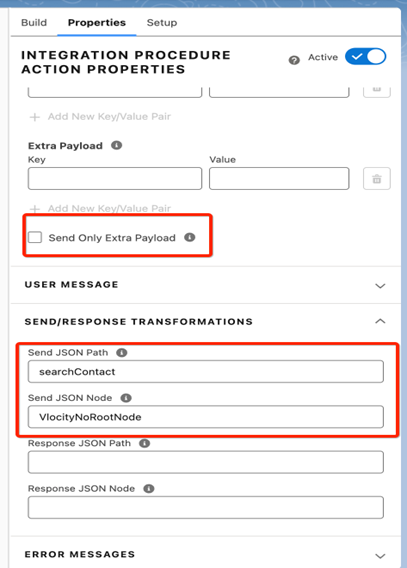
Pass only Required JSON node.
If send JSON path is blank Vlocity OOTB as default sends full JSON structure to each remote call.
Solution:
While calling any action like Integration procedure ,Remote Action and Data Raptor send only required data. Select either Send only extra payload checkbox or pass send JSON path and Node.
Note: Ensure that duplicate requests are avoided by sending the request either through SendJSONPath or Extra Payload, but not both.
VlocityNoRootNode-> If no node required to remove call. Pass null if there is no send JSON path.