
Your OmniScript is running smoothly in production. Users are navigating through steps, data is flowing, Integration Procedures are executing. And then – nothing.
A user hits step three, calls Integration Procedure, and something breaks. The error message says “Remote Action Error” but doesn’t tell you WHY. You check the logs. Three different systems to investigate. You find the IP failed, but why? Was it a timeout? API rate limiting? Bad data? Field mapping issue?
Your team spends three hours digging. You check Apex logs, DataRaptor mappings, network requests, governor limits, external API response codes. By the time you finally connect the dots and realize it was an API rate limit hit at 2 PM when system load was highest – you’ve lost hours of productivity and user trust.
And the worst part? It’ll probably happen again next week. Same time. But you won’t know until users complain.
If you’ve been there, you know this is one of the biggest pain points in OmniScript troubleshooting. And here’s the thing: humans are really slow at finding these patterns. You’d need to see thousands of failed executions across months to notice “hey, every Tuesday at 2 PM we hit rate limits.” Without that pattern recognition, you’re stuck firefighting instead of preventing.
This is where AI agents for Salesforce troubleshooting actually become useful. They don’t get tired. They see all the data. They find patterns in a thousand failed executions while you’re still reading the error message. And once trained, they flag problems before your users even hit them.
This guide walks you through exactly how to train an AI agent to troubleshoot OmniScript failures. We’re talking about real implementation – not theory. The data you need to collect, the machine learning approaches that actually work, how to build this in Agentforce, and what happens when it breaks (because it will, and that’s okay).
What Does It Actually Mean to Train an AI Agent for OmniScript Troubleshooting?
Here’s the thing: we need to be clear about what we’re building, because it’s not what you might think.
Training an AI agent to troubleshoot OmniScript failures isn’t about creating some magic black box that solves problems. It’s about teaching a machine learning model to recognize patterns in your OmniScript ecosystem that would take humans hours or days to spot.
Think of it like this. Every time your OmniScript executes, it leaves a trail.

Step 1: User enters data (form inputs).
Step 2: System validates it (Set Errors elements).
Step 3: OmniScript calls a DataRaptor to fetch related records.
Step 4: OmniScript triggers an Integration Procedure to push data to an external system.
Step 5: If any of this breaks, you get a log entry.
When you have weeks or months of this data, patterns emerge. Real patterns. Not guesses.
“Integration Procedure timeouts always happen between 2 PM and 3 PM on Tuesdays” = API rate limiting under peak load.
“DataRaptor failures only occur when Account.Type = Prospect AND Amount > $100,000” = Query performance issue under specific data conditions.
“Remote Apex call errors happen after processing 50+ records in a single transaction” = Governor limit violation.
An AI agent trained on this historical data learns these patterns. It establishes a baseline of what “healthy” OmniScript execution looks like in YOUR org (not a generic definition). Then when something deviates from that baseline, it flags it immediately. Not weeks later. Not when the bug report comes in. Now.
That’s the power: Early detection, pattern recognition, and root cause analysis at machine speed.
The Five Types of OmniScript Failures You’re Probably Experiencing Right Now
Before you train an AI agent, you need to understand what you’re actually trying to predict. Each failure type has a distinct signature in your logs.
┌─────────────────────────────────────────────────────────────┐
│ OMNISCRIPT FAILURE TYPE DISTRIBUTION │
│ (Based on Real-World Organizations) │
└─────────────────────────────────────────────────────────────┘
↓
🔴 INTEGRATION PROCEDURE FAILURES ████████████ 40%
(Most Common – API timeouts, field mapping, rate limiting)
Frequency: Very Common
Severity: HIGH
🟠 DATRAPTOR FAILURES ███████ 25%
(Performance degradation, data condition issues)
Frequency: Common
Severity: MEDIUM
🟡 VALIDATION/ERROR HANDLING FAILURES ██████ 20%
(False positives, broken cross-step dependencies)
Frequency: Medium
Severity: MEDIUM
🟡 TIMEOUT/PERFORMANCE FAILURES ███ 10%
(Slow queries, governor limits, large payloads)
Frequency: Medium
Severity: HIGH (Silent failures)
🟢 PERMISSION/ACCESS FAILURES ██ 5%
(Field security, object permissions, custom checks)
Frequency: Rare
Severity: LOW (Usually one user affected)
Integration Procedure Execution Failures (Most Common – 40%)
Your OmniScript calls an Integration Procedure to handle business logic – fetching data from Salesforce, calling an external API, calculating something complex. The IP starts executing. Then somewhere in the middle: it breaks.
Common causes:
- API timeouts (external service is slow or down)
- Field mapping failures (data doesn’t match expected format)
- Conditional logic errors (decision step returns unexpected data)
- Rate limiting (hit API quota limits)
- Credential issues (token expired, authentication failed)
The error bubbles back to OmniScript as “Remote Action Error” and users see a vague message.
DataRaptor Failures (Common – 25%)
Your OmniScript tries to load or manipulate data through a DataRaptor. The DataRaptor worked fine yesterday but fails today. Why?
- Performance degradation (works with 100 records, times out with 10,000)
- Data condition failures (fails when specific field is null or contains unexpected value)
- Mapping misconfiguration (doesn’t handle complex nested data structures)
- SOQL inefficiencies (DataRaptor generates non-optimal queries)
Validation and Error Handling Failures (Medium – 20%)
You’ve configured Set Errors elements to catch issues. You have custom error messages. But the validation logic is brittle.
- False positives (valid data flagged as invalid)
- Missing validations (invalid data allowed through)
- Error message paths misconfigured (users see cryptic messages instead of helpful guidance)
- Cross-step dependencies broken (change in one step breaks validation in another)
Timeout and Performance Failures (Medium – 10%)
The OmniScript doesn’t crash – it just hangs. The user hits “Next,” waits 30 seconds, and gets a timeout. These are the sneaky ones because the system doesn’t technically fail.
Common causes:
- Inefficient queries (N+1 query problem, missing indexes)
- Governor limit violations (approaching CPU/query limits)
- Slow external APIs (callout takes 20+ seconds)
- Large JSON payloads (moving gigabytes of unnecessary data)
- Browser performance (heavy LWC components, too many conditional blocks)
Permission and Access Failures (Rare – 5%)
An OmniScript works fine for most users, then fails for one specific profile. Why? Permissions.
- Field-level security (user can’t see a field being accessed)
- Object-level permissions (user can’t access the object)
- Custom permission checks (business logic denies access)
- Integration user permissions (agent user lacks required access)
Building Your AI Training Dataset: Everything Starts Here
Here’s the uncomfortable truth: you can’t train an AI agent without data. And not just any data.
You need:
- The right kind of data (structured, labeled, comprehensive)
- Enough of it (minimum 2 weeks, realistic minimum 60-90 days)
- From multiple sources (not just OmniScript logs – you need the full stack)
Most organizations skip this part. They try to build AI agents with two weeks of data and wonder why they get false positives everywhere.
Step 1: Enable Error Logging for Integration Procedures
Navigate to Setup → Omni Interaction Configuration.
Create a new configuration: name it ErrorLoggingEnabled (or be creative, but be consistent).
Enable it.
What happens next: Salesforce captures detailed information about every failed Integration Procedure step. Errors land in the OmniComponentErrorLog object. You’ll now see:
- Which step failed
- What error it returned
- What data it was processing
- Execution timestamps
Winter ’26 made this more granular. You now get visibility into individual step failures instead of just “the IP failed.” This is huge for training data.
Step 2: Capture Integration Procedure Events
Every IP call from your OmniScript logs events. These go into VlocityTrackingEntry__c.
You want to capture:
- Which step failed (IP_StepName__c)
- Input data provided (InputData__c)
- Error returned (ErrorMessage__c)
- How long it took (StepExecutionTime__c)
- Transient vs. persistent (did retry succeed? Did it fail consistently?)
This is your raw training data. Every row is a datapoint your AI model will learn from.
Step 3: Multi-Layer Log Correlation (This Is Critical)
Here’s where most organizations get it wrong: they only look at OmniScript logs.
But OmniScript failures almost always originate from deeper in the stack.
When you train an AI agent, you need to correlate data across:
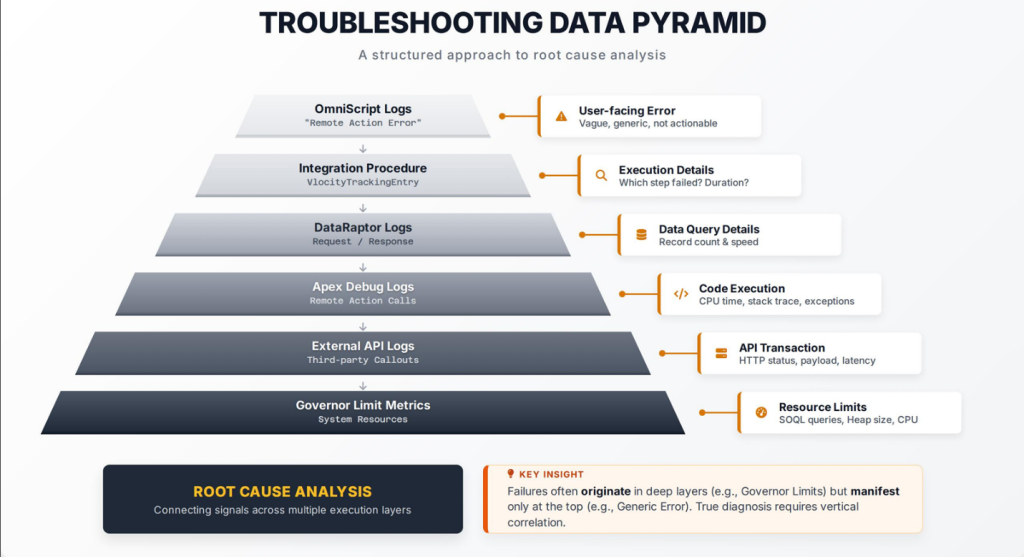
OmniScript Logs → Integration Procedure Logs → DataRaptor Requests/Responses → Apex Debug Logs (Remote Action calls) → External API Callout Logs → Salesforce Governor Limit Logs
Example: You see an Integration Procedure timeout. But is it:
- The number of records being processed? (data volume)
- The time of day? (system load)
- A recent change to that IP?
- A recent schema change?
- API rate limit information?
Only multi-layer correlation answers these questions.
Step 4: How Much Data Do You Actually Need?
Minimum: 2 weeks of continuous data.
Why 2 weeks? Anomaly detection algorithms establish baselines from historical behavior. With only 2 days, the model can’t tell what’s normal.
Realistic minimum: 30 days.
This captures:
- Different times of day with varying system load
- Different user types with different data patterns
- Rare failure modes that only happen occasionally
Optimal: 60-90 days.
With 60-90 days you’ve captured:
- Full monthly cycles
- Month-end closing peaks
- Seasonal patterns
- Rare edge cases that only happen once a month
If you have an org with existing logs? You’re in good shape. If you’re starting from scratch? Plan to collect data for a month before building anything serious.
Four Machine Learning Approaches (And Which One To Actually Use)
Not all machine learning is created equal. When troubleshooting OmniScript failures, you have options. Each has trade-offs.
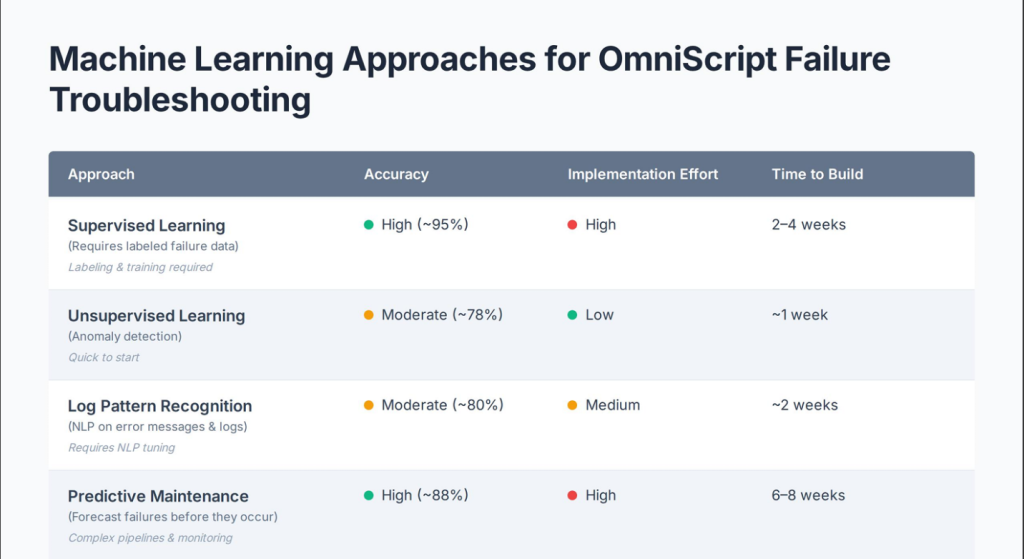
Approach 1: Supervised Learning (The Labeled Data Method)
How it works: You label historical OmniScript executions as “successful” or “failed.” Then you extract features from each execution: execution time, number of IP calls, number of DataRaptor queries, API callout count, data volume, etc. You feed these examples to an algorithm (random forest, gradient boosting, neural networks) and it learns the pattern.
Advantage: High accuracy. If you have 1,000 failure examples and 10,000 success examples, the model learns what separates them with high confidence.
Disadvantage: Labor intensive. Someone has to label 11,000 examples. Failures are easy (they’re in error logs). But you have to manually verify successful executions to ensure consistency.
Practical implementation:
- Extract all failed OmniScript executions from last 90 days
- Extract random sample of successful executions (same time period)
- For each execution, calculate: execution time, IP count, DataRaptor count, API callout count, data volume, timestamp features
- Train a random forest model (it handles mixed feature types well)
- For new executions predicted to fail, inspect feature importance to understand why
Realistic timeframe: 2-4 weeks to label data and train model.
Approach 2: Unsupervised Learning (Anomaly Detection Without Labels)
How it works: You don’t label anything. Just feed all your OmniScript logs (successes and failures mixed) into an anomaly detection algorithm. The algorithm finds which executions are statistical outliers.
Simple concept: if 99% of your executions complete in 500-2000 milliseconds, an execution taking 45 seconds is an outlier worth investigating.
Advantage: No labeling required. The model finds unusual patterns automatically. Can detect entirely new failure modes you’ve never seen before.
Disadvantage: Noise. Not every outlier is a failure. Maybe a slow execution is legitimate (large dataset processing). The system was under heavy load so everything ran slow. The model flags these as anomalies when they’re normal.
Practical implementation:
- Collect all OmniScript execution logs
- Calculate metrics: response time, error presence, retry count, IP failures, DataRaptor timeouts
- Feed into isolation forest or local outlier factor algorithm
- Algorithm returns anomaly score (0 = normal, 1 = very anomalous)
- Flag scores > 0.8 for investigation
Realistic timeframe: 1 week. Much faster than supervised learning.
When to use this: You don’t have clean labels, or you want to discover patterns nobody explicitly documented.
Approach 3: Log Pattern Recognition (NLP on Error Messages)
How it works: Instead of extracting numeric features, you analyze the actual error messages. “Integration Procedure TaxCalculation returned error: TIMEOUT_EXCEEDED” gets parsed. The algorithm identifies the template and groups similar messages.
Then it tracks frequency. “Integration Procedure [*] returned error: TIMEOUT_EXCEEDED” normally happens 1x per day. If you suddenly see it 50x per day, that’s flagged.
Advantage: Works directly with actual messages your system generates. No manual feature engineering.
Disadvantage: Requires good error messages. If your errors are vague (“Something went wrong”), this approach struggles.
Practical implementation:
- Collect all OmniScript error logs
- Use NLP to parse error templates
- Track frequency of each pattern
- Flag sudden spikes
Realistic timeframe: 2 weeks. Requires some NLP expertise.
Approach 4: Predictive Maintenance (Forecast Before Failures Occur)
How it works: You don’t just detect failures after they happen. You forecast failures before they occur.
You collect metrics that precede failures. For example: “IP execution time gradually increases over 4 hours, then timeout occurs.” Or “DataRaptor response time increases 20% above baseline, then failure happens 30 minutes later.”
A predictive model trained on this learns: “When IP execution time increases by 20% compared to moving average, there’s a 78% chance of timeout in the next hour.”
Advantage: Proactive. Alert admins BEFORE users hit errors. Instead of “Your IP failed,” you get “I’ve detected a pattern that typically precedes failures. Check API rate limits.”
Disadvantage: Most complex to implement. Requires understanding what metrics precede failures (which you discover through analysis).
Practical implementation:
- Analyze historical failures to identify leading indicators
- Collect time-series data (metrics over time)
- Train a time-series forecasting model
- Alert when predictions exceed threshold
Realistic timeframe: 6-8 weeks. Requires deep analysis of your failure patterns first.
Building Your First AI Agent: Step-by-Step in Agentforce
Now for the practical part: building this in Agentforce.
Agentforce is Salesforce’s agent platform. Winter ’26 added Observability features that make troubleshooting way easier. Here’s how to actually do this.
Step 1: Create an Agent User
An agent user is a Salesforce integration user with specific permissions. It needs:
✓ Read: OmniComponentErrorLog
✓ Read: VlocityTrackingEntry__c
✓ Read: Integration Procedure records
✓ Read: OmniScript records
✓ Write: Case records (if creating tickets)
✓ Read: Custom Log objects (if you built them)
Principle: Least privilege. Only permissions it needs to troubleshoot.
Step 2: Ground Your Agent With Knowledge
An AI agent without context is useless. It needs to understand:
What you have:
- What OmniScripts exist in your org
- What they do (business purpose)
- What Integration Procedures they call
- What those IPs do
- What DataRaptor mappings are in use
- Recent changes (deployments, config updates)
How to provide this:
- Internal knowledge articles (document your OmniScript architecture)
- Change logs (what changed last week? last month?)
- Historical incident records (root causes your team identified)
- API documentation (external integrations, rate limits, webhook configs)
In Agentforce terms, this is “grounding your agent.” With proper grounding, your agent doesn’t just flag anomalies – it explains them in business terms.
Step 3: Set Up Agentforce Observability (Winter ’26 Feature)
This is new in Winter ’26. It’s a game-changer.
You get:
- Centralized dashboard showing all agent activities
- Real-time monitoring of what your agent is doing
- Debugging tools to simulate error scenarios before production
- Logic tracing showing why the agent reached each conclusion
This matters because AI agents make mistakes. They misinterpret patterns. They draw wrong conclusions. With observability, you catch these mistakes and refine behavior.
Step 4: Build an Integration Procedure That Aggregates Error Data
Your troubleshooting agent needs to query error data constantly.
Create an Integration Procedure called AggregateOmniScriptErrors that:
- Takes as input: date range, OmniScript name, optional error code filter
- Queries OmniComponentErrorLog for failures in that range
- Groups failures by: error type, time of day, user profile, data characteristics
- Calculates failure rate trends
- Returns structured JSON with statistics
This becomes your agent’s data source.
Step 5: Create Agent Actions
In Agentforce, Agent Actions are things your agent can execute.
Create an action:
- Type: Integration Procedure
- Reference: AggregateOmniScriptErrors
- Input params: date range, OmniScript name
- Output: Shows failure analysis in conversation
Step 6: Define Agent Topics
A “topic” is something your agent knows how to handle.
Your agent should have topics like:
- “Investigate OmniScript timeout”
- “Diagnose Integration Procedure failure”
- “Identify DataRaptor issues”
- “Why are timeout errors spiking?”
- “Which users were affected?”
Step 7: Write Agent Instructions
This is where you teach your agent the patterns.
Example instruction:
“When asked about OmniScript failures:
- Always run AggregateOmniScriptErrors for the requested date range
- Examine error patterns
- If TIMEOUT_EXCEEDED errors spike between 2-3 PM, this indicates API rate limiting
- Recommend checking external API quota usage
- Suggest implementing exponential backoff in Integration Procedure”
Step 8: Test With Simulation Mode
Before deploying to production, use Agentforce’s simulation mode.
Test scenarios:
- Scenario 1: User reports 50 failures at 2:30 PM → Agent should identify timeout pattern
- Scenario 2: User reports failures affecting only one profile → Agent should check permissions
- Scenario 3: User reports failures only after recent deployment → Agent should check deployment changes
Root Cause Analysis: Teaching Your Agent to Dig Deeper
Detecting failures is one thing. Finding root causes is another.
The 5 Whys: Training Your Agent to Question
You start with an observation and ask “why” five times.
- Why did OmniScript fail? → Integration Procedure timeout
- Why did IP timeout? → API call was slow
- Why was API slow? → External service under load
- Why was external service under load? → They were running database maintenance
- Why didn’t we know about maintenance? → No monitoring of their status page
You teach your agent this technique:
Agent Instructions for RCA:
First: What error did the IP return?
Second: Check IP execution logs. Did a specific step timeout? Did an API return error?
Third: If API error, check response code. 429 = rate limiting, 5xx = server error
Fourth: For rate limiting, check request volume. For server errors, check their status page
Fifth: Recommend preventive measures (retry logic, fallback, monitoring)
The Fishbone Diagram: Organizing Root Causes
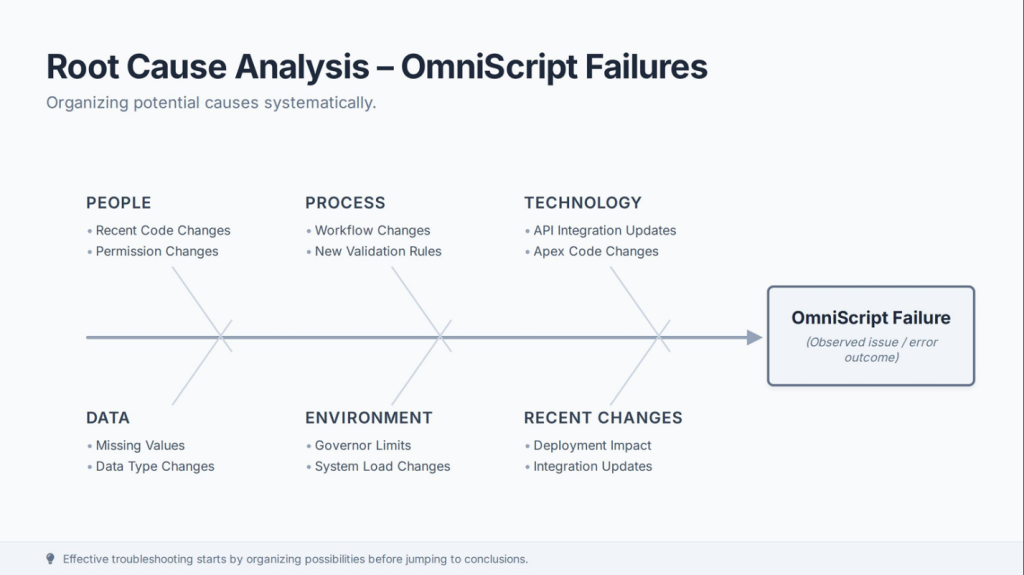
Fishbone (Ishikawa) categorizes potential causes:
PEOPLE → Recent code change, Permission changes
PROCESS → Workflow change, New validation
TECHNOLOGY → API integration update, Apex code change
DATA → Data type changes, Missing values
ENVIRONMENT → Governor limits, System load
Your agent applies this framework:
When investigating failures:
- Check Timeline: What changed in last 7 days?
- Check People: Did anyone modify OmniScript/IP/Apex?
- Check Process: Did validation rules change?
- Check Data: Are there new field values?
- Check Environment: Are we hitting governor limits?
Machine Learning for Root Cause Inference
Beyond manual techniques, you train ML models specifically for root cause prediction.
You collect:
- Observed symptoms (timeout, error type, affected users)
- Root causes (identified by your team)
- Contributing factors (recent deployments, data changes)
The model learns patterns:
“Timeout errors + small data + no recent changes = external API issue”
“Timeout errors + large data + recent deployment = performance regression”
With this model, your agent makes informed guesses about root causes, dramatically speeding troubleshooting.
The Messy Part: False Positives and Model Drift
Nobody talks about this, but AI agents in production aren’t perfect. They make mistakes.
False Positives: When Your Agent Cries Wolf
Your model flags an OmniScript as “likely to fail” when it actually succeeds.
Why? Maybe the system was under heavy load that day, so everything ran slow. But it didn’t actually fail.
If your agent raises false alarms too often, people stop trusting it. They ignore recommendations. You lose the benefit entirely.
How to handle this:
First: Tune thresholds carefully. Don’t flag executions deviating by 20%. Set threshold high enough that you’re catching real problems. Aim for 95% normal / 5% flagged.
Second: Implement feedback loops. Agent predicts failure. System observes actual outcome. If agent was right, great. If wrong, log that mismatch. Use mismatches to retrain and improve accuracy.
Third: Always provide context. Not “OmniScript likely to fail.” But “OmniScript execution time is 3x slower than normal (likely system load), but historical data shows it still completes 95% of the time. Proceed with caution.”
Model Drift: When Yesterday’s Patterns Stop Working
Your model trains on 2024 data. Becomes very good at predicting based on those patterns.
Then it’s February 2025. You:
- Upgraded infrastructure
- Changed API endpoints
- Hired new developers with different coding patterns
- Migrated to new external service
Suddenly your model’s predictions are way off. It learned patterns that no longer apply. This is model drift.
How to prevent it:
Continuous retraining: Don’t train once and leave. Retrain monthly or quarterly with recent data. Model should get better as you collect more data.
Performance monitoring: Track accuracy over time. Precision dropping? Recall dropping? Time to retrain.
Version control: Keep multiple model versions. New model performs worse? Quickly rollback.
Human validation: For high-impact predictions, have humans verify before taking action.
What’s Actually Coming in 2026?
Salesforce is investing heavily in AI troubleshooting.
Agentforce Observability (Winter ’26 – Available Now)
Centralized dashboard for monitoring agents. You see:
- What agent is doing in real-time
- What data it’s querying
- What decisions it’s making
- Why it made those decisions
- Success rates for different tasks
Critical because it validates your agent actually works correctly.
Enhanced Logging (Winter & Spring ’26)
Integration Procedure error logs are getting more granular. New fields in OmniComponentErrorLog give better failure context.
Spring ’26 adds IF statements to Formula Elements in Integration Procedures. Gives you more flexible error handling.
New Agentforce Builder (Beta in Winter ’26)
Design agents using natural language instead of complex instructions.
Most important: simulation mode. Before deploying to production, simulate thousands of scenarios. See how the agent responds. Catch mistakes before they affect users.
Einstein Studio Model Customization
Available now. Customize AI models for your specific use cases. Adjust temperature, frequency penalty, presence penalty.
For troubleshooting, tune for precision (low temperature, high penalties). You want focused recommendations, not creative hypotheticals.
Agent Script (Spring ’26)
Define deterministic logic in agent flows. Troubleshooting agents shouldn’t be probabilistic. They should follow structured logic paths.
IF Integration Procedure error = ‘TIMEOUT_EXCEEDED’ AND time = 14:00-15:00 THEN recommend checking API rate limits
Your 6-Phase Implementation Roadmap
Phase 1: Data Foundation (Month 1-2)
- Enable OmniComponentErrorLog and IP event tracking
- Start collecting logs from all OmniScripts
- Set up queries to analyze failure patterns
- Document your OmniScript architecture
Phase 2: Initial Anomaly Detection (Month 3-4)
- Analyze 60-90 days of historical data
- Implement unsupervised anomaly detection
- Test against actual failure logs
- Tune thresholds, identify false positives
Phase 3: Build Your First Agent (Month 5-6)
- Create troubleshooting agent in Agentforce for critical OmniScript
- Define topics and actions
- Connect to aggregation Integration Procedures
- Use Observability to monitor and refine
Phase 4: Supervised Learning & RCA (Month 7-9)
- Collect labeled training data
- Train supervised learning models for failure prediction
- Implement 5 Whys and Fishbone techniques
- Teach agent to apply these techniques
Phase 5: Scale & Optimize (Month 10-12)
- Extend agent to handle multiple OmniScripts
- Implement continuous retraining
- Set up performance monitoring
- Reduce false positives
Phase 6: Advanced Features (2026+)
- Implement predictive maintenance
- Use Spring ’26 Agent Script
- Experiment with custom Einstein Studio models
- Integrate with incident management
Real Implementation Challenges
Challenge 1: Getting Historical Data
If your org is new, you have zero training data. You have to wait. For at least a month. Maybe two.
Solution: Start logging NOW even if you can’t build the agent yet. By the time you’re ready to build, you’ll have data.
Challenge 2: Labeling Data
Supervised learning requires labeled examples. Failures are easy to identify. Success is harder to define.
Solution: Define “success” clearly. “No errors AND execution time < 5 seconds” for example. Then stick with that definition.
Challenge 3: External API Variability
Your IP calls an external API. That API is sometimes slow. Sometimes fast. Same endpoint, same data, different performance.
This makes patterns hard to identify.
Solution: Track API performance metrics separately. Your model learns “API was slow on Tuesday at 2 PM, so slower IP execution is normal.”
Challenge 4: False Positive Burnout
You deploy your agent. First week, it’s great. Then it starts flagging things that aren’t actually problems.
Your team stops trusting it. Stops reading its recommendations.
Solution: Be conservative with thresholds initially. Better to miss some problems than annoy your team with false alarms.
Challenge 5: Keeping Knowledge Updated
You document “Integration Procedure XYZ calls external API at vendor.com.” Six months later, they change their API.
Your agent still recommends checking the old endpoint.
Solution: Implement a knowledge update process. When you change an IP or external integration, update agent knowledge base immediately.
Conclusion: This Is Happening. You Can Lead or Follow.
Training an AI agent to troubleshoot OmniScript failures isn’t futuristic anymore. The tools exist. Agentforce Observability is available now. Einstein generative AI is built in. The logging infrastructure is there.
What’s missing in most organizations isn’t technology. It’s a structured approach to building these agents. It’s willingness to invest in the foundation (data collection) before jumping to fancy ML models.
Here’s what happens:
You start by enabling logging. Boring. Unglamorous. But critical.
You collect 60-90 days of data. You’re not building anything yet. Just collecting.
Then you run anomaly detection against that data. Nothing fancy. Just “find the outliers.”
You look at those outliers. Some are real problems. Some are false positives. You tune your threshold.
Once you’re confident in your detection, you build your first Agentforce agent for your most critical OmniScript.
You test it with simulation mode. You catch mistakes before production.
You deploy. It helps. It also makes mistakes. You document those mistakes. You retrain.
A few months in, your agent is actually useful. You extend it to another OmniScript. Then another.
A year in? Your team is spending way less time reading error logs. Spending way more time building features.
That’s the journey.
The teams that figure out AI-driven troubleshooting first will have significant advantage. They’ll move faster, resolve issues quicker, spend less time in firefighting mode. That advantage compounds.
So start now. Don’t wait for the “perfect” moment. Enable logging today. Collect data this month. Build your first agent next month.
Join the organizations turning OmniScript troubleshooting from a manual nightmare into something actually intelligent and automated.
Your future self will thank you.
Ready to Implement AI-Driven OmniScript Troubleshooting?
This journey from manual troubleshooting to AI-powered pattern recognition isn’t quick, but it’s worth every month of investment. Start enabling error logging today – your team will thank you when they’re spending less time in error logs and more time building.
Explore more Salesforce OmniStudio insights:
YouTube: https://www.youtube.com/@2CreativeSolutions – Watch practical implementation tutorials
Website: https://2creative.ca/ – Read more technical guides and case studies
LinkedIn: https://www.linkedin.com/company/2cretiv – Stay updated on latest Salesforce innovations


