
Picture this: It’s month-end, and your finance team is stuck in a spreadsheet labyrinth. A customer upgraded their seat count mid-cycle. Someone’s still billing them at the old rate. Three systems show different numbers. Your CFO is asking uncomfortable questions. Your CRO is frustrated. And nobody can quickly answer: “What are we actually earning this month?”
Welcome to the subscription business without proper revenue operations.
Now imagine a different scenario. A customer upgrades their tier on January 15th. The system automatically calculates the prorated amount for the remaining days at the old rate, generates a credit, and charges the new rate going forward. Tomorrow, when renewals kick in, 50+ customers get automatically renewed with zero manual effort. Finance closes the books with a single click – everything reconciles perfectly.
This isn’t magic. It’s Revenue Cloud Advanced (RCA) built specifically for how subscription businesses actually work.
The Subscription Billing Crisis That Nobody Talks About
Let’s talk about what’s really happening in most subscription companies right now.
You’ve probably experienced this: a customer calls and says they want to add five more seats starting tomorrow. Your sales rep manually quotes them, the deal gets approved, they send a contract, everything gets signed. Then what? Someone has to:
- Calculate what they owe for the partial month at the old rate
- Calculate the new recurring amount
- Update the invoice schedule
- Generate an amended quote
- Create a new contract
- Communicate the changes to finance
- Hope everything matches when the customer sees the invoice
And then that same company gets 50 similar requests next week, and suddenly half your team is stuck in manual amendment hell.
Or here’s another real scenario: A customer’s annual subscription renews on December 1st. Their account manager didn’t notice. They weren’t reminded. The renewal email went to spam. By the time anyone realized, the customer had already churned and left a one-star review. Revenue leakage. Customer loss. Completely preventable.
According to recent data, companies with poor subscription management lose 25-40% in potential revenue through billing errors, missed renewals, and payment failures. One study found that SaaS companies making manual subscription adjustments experienced 50% more billing disputes than those using automated systems.
This is what happens when you try to manage subscriptions with tools designed for one-time sales decades ago.
Why Traditional CPQ Breaks for Subscriptions
Before we talk about the solution, let’s understand why your current system is probably struggling.
Traditional Salesforce CPQ was brilliant when it launched. It solved the problem of complex one-time deals – you need to build a quote, apply discounts, get approvals, send it to the customer. Great.
But here’s where it fails for subscriptions: CPQ thinks in terms of transactions. Quote → Order → Done.
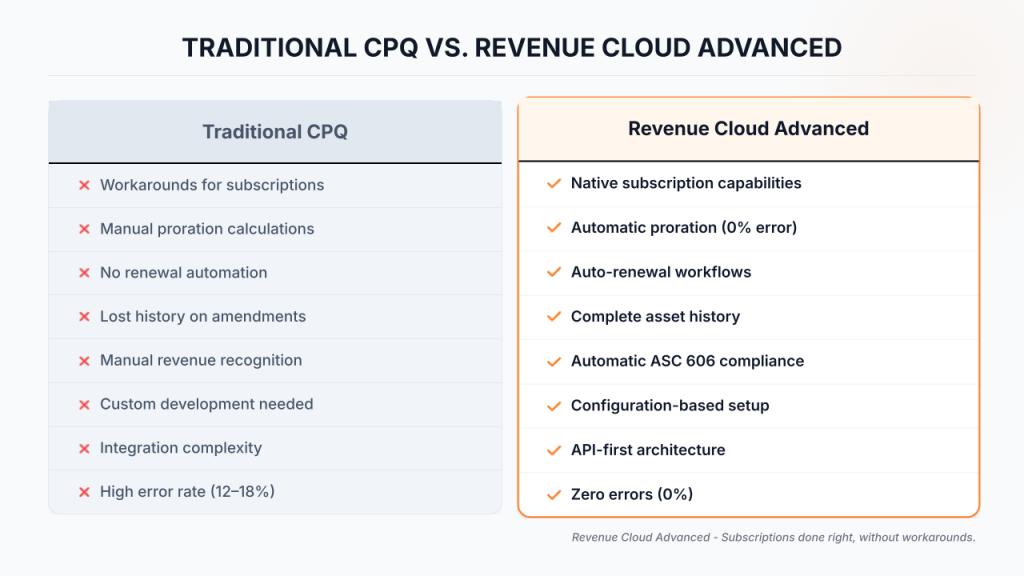
Subscriptions live in a different world. They have:
- Start dates and end dates (not just close dates)
- Renewal workflows (not just new opportunities)
- Mid-cycle amendments (not just new quotes)
- Asset history (not just deal history)
- Repeating billing (not just one invoice)
- Usage tracking (not just quantities)
- State changes (not just status updates)
CPQ forces you into workarounds. When a customer renews, you cancel their old subscription and create a new one – losing the history. When they amend, you create a new quote and cancel the old one – messy and error-prone. Usage tracking? You’re probably building that with custom code.
Revenue Cloud Advanced doesn’t work around subscriptions. It was built for them.
The Seven Pillars That Make RCA Different
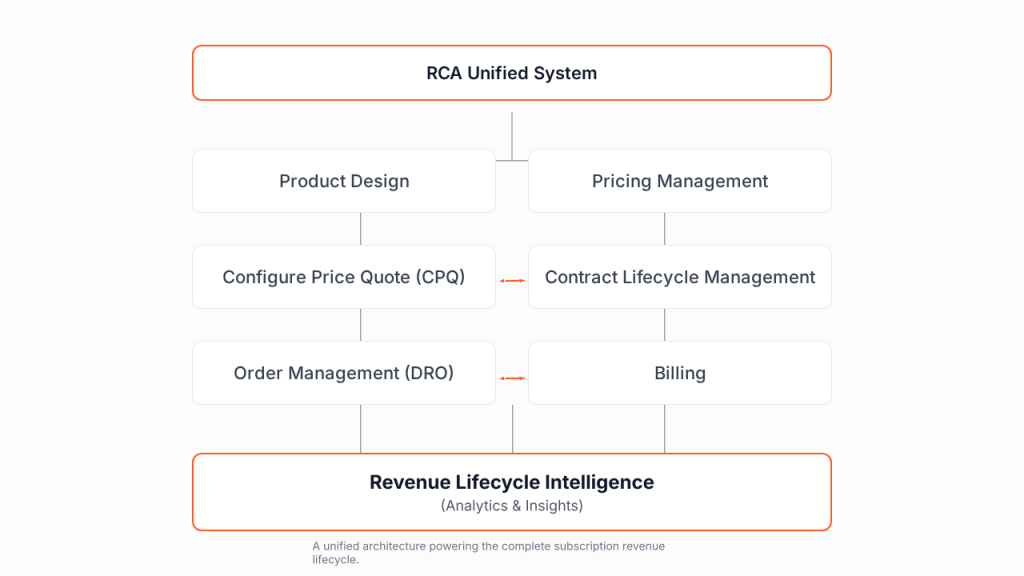
RCA is built on seven interconnected areas that create a unified revenue management system:
1. Product/Service Design – You define what you sell. For subscriptions, this means setting up your tiers (Basic, Pro, Enterprise), your billing frequencies (monthly, annual, quarterly), and your renewal rules. You’re not just listing products; you’re defining how they’re sold and renewed.
2. Pricing Management – This is where subscriptions get powerful. You create pricing not just as a number, but as a ruleset. “Annual subscriptions get 20% off monthly rates.” “Enterprise tier customers get volume discounts.” “Price increases by 5% on January 1st.” These aren’t static prices – they’re intelligent pricing rules that apply consistently.
3. Configure, Price, Quote (CPQ) – A sales rep logs in and builds a quote. They select a product tier, the billing frequency, and any add-ons. RCA automatically applies all your pricing rules, shows the monthly recurring revenue (MRR), annual recurring revenue (ARR), and total contract value. No manual math. No errors.
4. Contract Lifecycle Management (CLM) – The quote becomes a contract. RCA can auto-generate the contract (no more Conga/Nintex workarounds), route it for approvals, integrate e-signature, and archive it. For subscriptions, the contract captures the critical dates – start date, end date, renewal terms – all structured data RCA can act on.
5. Order Management – When the contract is signed, it becomes an order. RCA’s Dynamic Revenue Orchestrator takes that order and breaks it into actionable steps. For a SaaS subscription, this means: provision the account, create the support ticket, send the welcome email. For a physical subscription box, it means: schedule the first shipment. The system tracks every step and notifies teams when something completes.
6. Billing – This is where the automation magic happens. RCA automatically creates billing schedules. For a 12-month subscription, it creates 12 individual billing schedule records. On each scheduled date, it auto-generates an invoice. If the customer amended mid-cycle, the schedules reflect prorated charges. When they cancel, refunds calculate automatically.
7. Revenue Lifecycle Intelligence – Throughout this entire journey, RCA is building analytics. Dashboards show ARR at risk, renewal success rates, churn drivers, and revenue by cohort. Finance teams see real-time revenue recognition by accounting period.
Here’s what matters: These seven areas don’t exist in silos. They feed each other. A change in Billing automatically updates Revenue Intelligence. A new Order triggers Contract obligations. This integration is what makes subscription management smooth.
Real-World Use Case #1: E.ON One’s Chaos-to-Clarity Story
E.ON One is the software division of energy company E.ON. They sell complex energy management subscriptions that combine flat-rate monthly fees with usage-based charges. Think: base subscription for software access + charges for actual energy consumed.
Their problem: It was pure chaos.
Salespeople had to manually assemble complex quotes by mixing different product types. The product catalog was disorganized – no clear hierarchy, no selling models, no consistency. Renewals happened in spreadsheets (yes, really). Customer amendments meant manually rewriting contracts and hoping finance got the memo. Nobody could answer: “Which customers renew next month?”
Internally, the teams were disconnected:
- Sales didn’t know if a complex deal was even possible
- Finance couldn’t predict cash flow because renewals were unpredictable
- Customer success couldn’t manage renewals proactively
Their transformation:
E.ON One reorganized everything around a unified product catalog using RCA. They defined clear selling models – “subscription + usage,” “annual prepay,” “hybrid plans.” Sales reps could now build a complex quote in 15 minutes instead of 2 hours.
But the bigger wins came after the sale:
Renewals became automatic. When a subscription approached its end date, RCA generated a renewal quote automatically. If the customer wanted the same terms, they clicked approve. RCA created the renewal order, updated the asset end date, and created new billing schedules. Completely hands-off.
Amendments became painless. A customer called mid-cycle asking for more capacity. Instead of a 3-day process, it was: rep clicks “amend,” selects the new tier, RCA calculates proration, customer approves, new order created, billing updated. Done.
Finance gained visibility. They went from month-end reconciliation taking 5 days to happening in near-real-time. Every invoice was correct because the math was automated.
The results:
- Sales productivity up 35% (less quoting time, more selling)
- Month-end close time cut from 5 days to 1 day
- Billing error rate dropped from 7% to <0.5%
- Customer renewal rate improved 12% (because renewals were proactive, not missed)
Real-World Use Case #2: Cool Cats Technologies – Seat-Based Subscriptions Done Right
Now consider a SaaS company using seat-based pricing (you pay per licensed user). It seems simple until customers start scaling and changing their seat counts.
Cool Cats Technologies faced this problem: A customer starts with 10 seats at $50/user/month = $500/month. Three months later, they hire 15 new people and want 25 seats. What happens?
Without RCA: Someone manually calculates: They used 10 seats for 3 months ($1,500) plus they owe 15 additional seats for the partial month. Figure out the daily rate, calculate proration, generate a new invoice, hope nothing breaks.
With RCA: Customer requests amendment on day 15. RCA automatically:
- Calculates: 10 seats × 15 days at old rate = $250 (prorated amount used)
- Calculates: 25 seats × 15 days at new rate = $625 (prorated amount for remainder)
- Issues: Credit for unused days of old rate + charge for new prorated amount
- Updates: Billing schedule now shows 25 seats × $50 = $1,250/month going forward
- Logs: This entire transaction in the asset record with perfect audit trail
Most importantly – RCA tracks this in the asset record. Finance doesn’t have to reverse-engineer what happened to this customer’s subscription. The system knows:
- 10 licenses from Jan 1 – Jan 15
- 25 licenses from Jan 15 – Dec 31
When it’s time to recognize revenue, RCA has already calculated that January earned $X based on 10 seats for 15 days and 25 seats for 16 days. No spreadsheet gymnastics. No guessing.
And when Cool Cats’ sales team handles 500+ seat amendments per month? Same process, same accuracy, zero manual work.
Real-World Use Case #3: Cloud Infrastructure with Usage-Based Billing – The Complex Model
The most challenging subscription model combines a base subscription with usage-based overage charges. A cloud infrastructure company sells:
- Base plan: $500/month for 1,000 API calls + 500GB storage
- Overage: $0.10 per additional API call, $5 per additional GB storage
A customer using 1,500 API calls and 600GB storage should be billed:
- Base subscription: $500
- API overage: 500 calls × $0.10 = $50
- Storage overage: 100GB × $5 = $500
- Total: $1,050
The challenge: Tracking consumption across thousands of customers, applying tiered rates, handling refunds for prepaid credits, managing expiring credits – this is where traditional billing systems completely fall apart.
How RCA handles it:
RCA has native consumption management built into the platform. Here’s the actual workflow:
- Consumption tracking – Usage data flows in (via API integration or manual entry). The system logs every API call, every GB stored, for every customer, timestamped.
- Automated aggregation – At billing time, RCA’s consumption process runs and aggregates: This customer made 1,523 API calls this month, used 612GB storage.
- Intelligent rate application – The system applies your rate card: First 1,000 calls free with subscription, next 523 calls × $0.10 = $52.30. For storage: First 500GB free, next 112GB × $5 = $560.
- Wallet management – If this customer has $200 in prepaid credits, RCA applies those credits to the invoice automatically. Remaining credit balance updates in real-time.
- Overages and overage alerts – If they consistently exceed their base allowance, alerts notify your account team to suggest the next tier up.
- Expiration enforcement – If credits expire on March 31st and they haven’t been used, RCA automatically prevents use after that date.
The result? Accurate usage billing with zero manual calculation. Customers see detailed breakdowns on their invoices explaining exactly why they were charged what they were charged.
Asset-Based Management: The Core Architecture
Here’s where RCA fundamentally differs from any other system – everything is asset-based.
When you create an order for a subscription in RCA, the system automatically creates an asset record. This asset isn’t static. It tracks the complete lifecycle of what happened to this subscription.
Let’s say a customer has this journey:
- Month 1-3: 10 licenses, $100/month
- Month 4-8: 25 licenses, $100/month (upgraded)
- Month 9: Canceled
In legacy systems, you’d have:
- Subscription #1 (now deleted)
- Subscription #2 (now deleted)
- Cancellation record
- Nobody knows the full journey without digging through history
In RCA, you have one asset record with three asset state periods:
- State period 1: 10 units, Month 1-3, $100/month
- State period 2: 25 units, Month 4-8, $100/month
- State period 3: Canceled, Month 9

Your entire team can see this asset’s journey in one place. Finance knows exactly when the subscription changed. Sales knows the upgrade happened in Month 4. Customer success knows when they canceled.
This asset-based model is what makes renewals, amendments, and cancellations work seamlessly. Each change creates a new state period. The history is preserved. The audit trail is perfect.
The Amendment Workflow: Where RCA Shines
Let’s walk through an actual amendment to show you how this works.
Day 15 of the subscription: Customer calls and says, “We need to upgrade to the next tier, effective immediately.”
Before RCA:
- Sales rep creates a new quote for the new tier
- Quote gets approved (if needed)
- Customer signs new contract
- Finance manually calculates what to charge for the remainder of the month
- Finance manually updates the billing schedule
- Original subscription sometimes gets canceled, sometimes left orphaned
- Nobody’s completely sure the math is right
With RCA:
- Sales rep clicks “Amend Asset”
- Selects the new tier from the configurator
- RCA calculates proration automatically
- Shows the charge: “Customer will be charged $X for remaining days”
- Amendment goes through approval (if configured)
- Once approved: New order created, billing schedules updated, asset state period logged
- Done
The system automatically:
- Calculates prorated credit for unused portion of old tier
- Calculates prorated charge for new tier (effective immediately)
- Updates all billing schedules for future periods
- Logs the entire transaction
- Updates revenue recognition schedules
- Sends notifications to all relevant teams
This is repeatable. One customer, one hundred customers, one thousand customers – same process, same accuracy, zero manual work.
Renewals: From Chaos to Automation
Renewal chaos is real. Studies show that poorly managed renewals account for 30-40% of net revenue leakage in SaaS companies.
Here’s the typical problem:
- Renewal dates are scattered across months
- Renewal reminders go unsent or to wrong addresses
- Contract terms get lost
- Manual renewal quotes are error-prone
- Customers get surprised by renewal notifications
RCA’s renewal workflow:
60 days before a subscription ends, you can configure RCA to automatically create a renewal opportunity. This opportunity can include:
- Same terms as the original subscription
- Auto-calculated pricing (including any price increase you’ve configured)
- Full contract history (so nothing gets lost)
- Customer communication already scheduled
The customer gets a renewal notification early. Your account team sees it in their queue. If the customer wants the same terms, they approve and it’s done. If they want to negotiate different terms, sales opens an “override renewal” which goes through the same amendment workflow.
When the renewal is approved, RCA:
- Creates a renewal order
- Updates the asset end date
- Creates new billing schedules
- Updates revenue schedules
No renewal gets missed. No terms get lost. And customers aren’t surprised.
Proration: The Math Problem Solved
Proration is beautiful in theory, terrifying in practice.
The formula is simple: (Days Used / Days in Period) × Monthly Cost
But executing it correctly across thousands of customers with:
- Different amendment dates
- Different billing periods
- Different currencies
- Different discount structures
- Different add-on combinations
…that’s where systems fail.
RCA handles proration natively. When you amend a subscription effective mid-cycle, the system knows:
- Current rate and end date
- New rate and new effective date
- Exact number of days used at each rate
- Whether this is monthly, quarterly, or annual billing
It calculates:
- Credit owed for unused days at old rate: (Days Remaining / Days in Period) × Old Monthly Rate
- Charge for new period at new rate: (Days Remaining / Days in Period) × New Monthly Rate
- Net adjustment: Charge – Credit
And it does this with 100% accuracy, 100% of the time, with perfect audit trails showing exactly how the calculation was made.
Usage-Based and Tiered Pricing: Complex Models Made Simple
Not every subscription is flat-rate. Some charge based on consumption. Some use tiered pricing where the rate changes based on volume.
Progressive tiers work like: 1-50 units at $1 each, 51-100 units at $0.90 each, 100+ units at $0.80 each. (Not volume-based – progressive means you apply the rate to only the units in that tier.)
Block tiers work like: 1-10 units, everything is $1 each. 11+ units, everything is $0.90 each. (Volume-based – the rate applies to all units.)
Tiered pricing in RCA:
You configure these pricing structures once. RCA’s pricing procedure engine applies the correct tier to each customer based on their consumption. If Customer A uses 75 units and Customer B uses 150 units, they’re automatically charged different rates. No manual calculation. No errors.
For usage-based models, RCA has wallet management built in. If a customer prepays $5,000 in credits:
- Each billing cycle, RCA draws down from the wallet
- Remaining balance shows in real-time
- When credits run low, alerts notify the account team
- When credits expire, RCA automatically prevents use after that date
- No disputes about “I thought I had prepaid credits”
The Seven Pillars in Action: A Complete Workflow
COMPLETE SUBSCRIPTION JOURNEY IN RCA
1. QUOTING (CPQ Pillar)
Sales rep builds quote → RCA applies all rules → Shows MRR/ARR
↓
2. CONTRACT (CLM Pillar)
Auto-generated → Approved → E-signed → Key dates captured
↓
3. ACTIVATION (Order Management)
Order created → Dynamic Revenue Orchestrator → Provision, email, support
↓
4. RECURRING BILLING (Billing Pillar)
Auto-invoke schedules → Generate invoices → Track payments
↓
5. AMENDMENTS (Order Mgmt + Billing)
Customer requests change → Auto-proration → New billing schedules
↓
6. RENEWAL (Revenue Intelligence)
60-day reminder → Auto-renewal quote → Customer approval → New term
↓
7. CHURN/CANCELLATION
Customer exits → Asset closed → Final revenue recorded → Analysis
ALL STAGES CONNECTED • ZERO MANUAL WORK • PERFECT AUDIT TRAIL
Let’s trace one subscription through all seven pillars to see how this actually works:
Product Design: You’ve defined a “SaaS Pro” product with:
- Monthly and annual billing options
- Add-on options (premium support, advanced features)
- Pricing rules (20% discount for annual)
Pricing Management: You’ve set the base price at $99/month. Annual = $99 × 12 × 0.8 = $950 annually.
Quote: Sales rep builds a quote. Customer selects SaaS Pro, annual billing, adds premium support. RCA shows: Base $950 + Support $200 = $1,150 total contract value, $95.83/month MRR.
Contract: The quote becomes a contract. Customer e-signs within Salesforce. Contract captures: Start date 01/01/2025, end date 12/31/2025, renewal auto-enabled.
Order: Signed contract becomes an order. RCA’s Dynamic Revenue Orchestrator triggers: Provision account, create welcome email, generate billing schedule.
Billing: System creates 12 billing schedule records (one per month). On 01/01/2025, it generates the first invoice for $95.83 (prorated for the month). On 02/01/2025, next invoice for $95.83. On 12/01/2025, final invoice. (Annual billing would show one invoice upfront.)
Revenue Intelligence: Dashboard shows: This customer has $1,150 ARR. They’re in Month 1 of their 12-month term. Renewal is 11 months away. Revenue is recognized monthly at $95.83.
Day 45: Customer requests to upgrade to “Pro+” tier at $149/month.
RCA handles the amendment:
- Calculates days remaining in first month: 15 days
- At old tier ($99/month = $3.30/day): 15 days × $3.30 = $49.50 credit
- At new tier ($149/month = $4.97/day): 15 days × $4.97 = $74.55 charge
- Net: Customer charged $25.05
- New billing schedule: $149/month for remaining 11 months
- Revenue intelligence updates: ARR now $1,638 (based on new tier + remaining months)
All seven pillars working together. All automated. All accurate.
Updates That Matter
RCA has been evolving rapidly. Here are the updates most relevant for subscription companies:
Advanced Configurator (General Availability) – You can now build complex product hierarchies without custom code. Nested options (choose a tier → choose add-ons → choose support level) flow naturally.
Product Attributes Expansion – You can now define up to 200 attributes per product (previously 15). If your product needs rich customization, you have the space for it.
Smart Auto-Renewals – Sales reps can now override renewal terms during the initial sale. If you know a customer will want different terms at renewal, you can configure that upfront.
Wallet Management Improvements – Prepaid credit balances now display directly on account records with real-time drawdown visibility.
Large Quote Support – Quotes with 1,000+ line items no longer cause performance issues. If you’re selling complex bundles, this matters.
CPI-Based Price Adjustments – You can now automatically adjust prices based on inflation indices, monthly/quarterly/annually. One of CPQ’s biggest pain points solved.
When RCA Becomes Essential
RCA isn’t the right choice for every business. If you’re selling simple $50/month subscriptions with no amendments and basic invoicing, simpler systems might suffice.
But if you answer YES to any of these, RCA moves from “nice-to-have” to “essential”:
- ✓ Do customers ever change their subscriptions mid-cycle?
- ✓ Do you offer multiple pricing tiers or usage-based billing?
- ✓ Do renewals require any kind of management?
- ✓ Do you struggle with renewal churn?
- ✓ Does your finance team spend significant time on revenue reconciliation?
- ✓ Do you operate in regulated industries requiring audit trails?
- ✓ Do you manage subscriptions across multiple entities or currencies?
- ✓ Do you offer hybrid pricing (subscription + usage)?
These are the scenarios where RCA’s unified approach pays massive dividends.
Implementation Reality: The Honest Conversation
Let’s be real: implementing RCA is significant. You’re not just adding a new tool; you’re rethinking how your organization manages revenue.
What needs to happen:
- Product rationalization – Your product catalog gets cleaned up. Consolidate variants, document pricing logic, eliminate redundant SKUs. This alone takes 4-8 weeks.
- Process redesign – Your sales process changes (in good ways). Quote-to-close gets faster. Your billing process changes (in great ways). Manual invoicing mostly disappears.
- Data migration – Historical subscription data needs to be mapped into the new asset model. This is tedious but necessary.
- Team training – Sales reps need to learn guided selling. Finance teams need to understand new workflows. Support teams need to see how to look up subscription history.
Typical timeline:
- Mid-market company (50-100 reps): 4-6 months
- Enterprise company (200+ reps, complex pricing): 6-12 months
- Part of that is waiting for your team to learn, not just implementation work
Real ROI that companies report:
- 40-50% reduction in month-end close time
- 30-40% improvement in sales rep productivity
- 60-80% reduction in billing errors
- 2-3 months improvement in time-to-cash
For a company with $10M ARR, this ROI typically justifies the implementation cost within 12-18 months.
From Manual Chaos to Automated Excellence
Here’s what we know after talking to dozens of subscription companies: They all start in the same place. Spreadsheets. Manual processes. Multiple systems that don’t talk to each other.
They all have the same problems: Renewals get missed. Billing has errors. Finance can’t close on time. Customers get frustrated with wrong charges.
But the ones that fix it – they move to systems purpose-built for subscriptions.
RCA for subscription businesses isn’t trying to be everything to everyone. It’s built on a simple premise: subscriptions are different from transactions. They have lifecycles. They change mid-term. They renew. They need tracking. And all of this should be automated.
When a customer upgrades mid-cycle, the system should know. When a subscription renews, it should happen automatically. When a payment fails, it should retry intelligently. When finance closes the books, everything should reconcile instantly.
That’s not magic. That’s just RCA working the way subscription operations should work.
If you’re currently managing subscriptions with tools designed for one-time sales, the gap between where you are and where you could be is probably larger than you realize.
Ready to Transform Your Subscription Operations?
Managing subscriptions with tools built for one-time sales is leaving money on the table.
Here’s where to start:
– Audit your current state – Where are the manual touchpoints and billing errors?
– Define your success metrics – Faster renewals? Zero billing disputes? Better visibility?
– Understand the seven pillars – See how RCA handles your entire subscription lifecycle
– Test one use case – Start with your biggest pain point
Connect with 2Creative’s Revenue Cloud specialists to discuss your subscription challenges and how RCA could transform your operations.
Visit 2Creative Solutions for more Salesforce tutorials and resources on our platform.


