
A Loop block is a group element in an Integration Procedure, that is use to loop over a list/ array of objects. It works like a for loop in traditional programming where we loop over list to perform actions on the list.

We can perform Conditional Execution by adding conditions in the ‘Execution Conditional Formula’ of a Loop Block to decide whether to execute the whole Loop Block, so checking for conditions that would need to be true before we execute the Loop the first time. for example :
Here we will check if the totalPrice is set to 0 to make sure we execute Loop Block.


If we want to have some action to be executed based on some condition that depends on the data in the List objects in a loop, we can do that in the ‘Execution Conditional Formula‘ field of a action like:
Here we are checking if the ListPrice in each object of the loop is less than 100, then we execute the action.

Example:
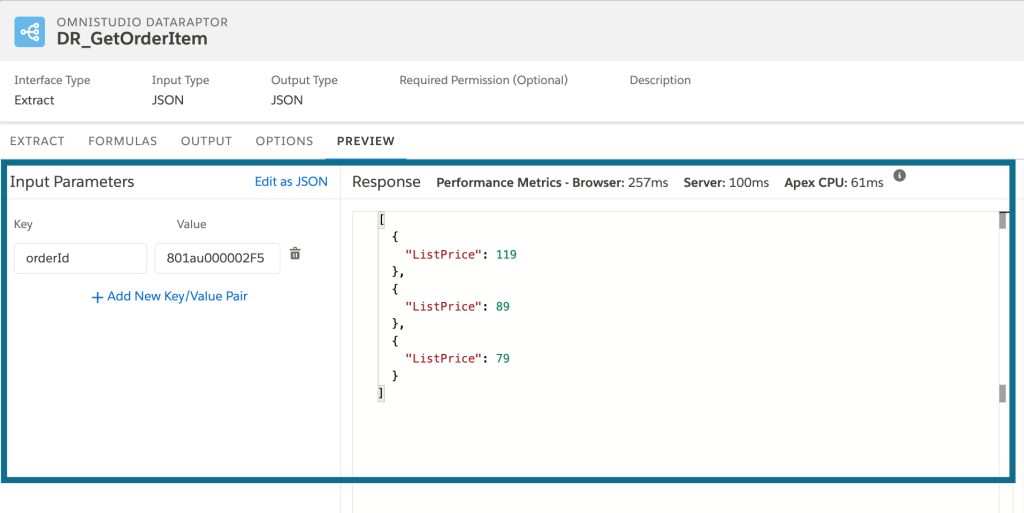
Now to understand the Loop Block lets work on a example where we use a DataRaptor to get a list of OrderItem for a Order, which returns a list of objects, where each object has the ListPrice of the OrderItem. We will then Use the DataRaptor to get a list and then pass the list to the Loop Block and calculate the total price of the order.
Data Raptor (DR_GetOrderItem)


Now let’s create an Integration Procedure.
Integration Procedure (IP_Loop_Block_Example)

First start by adding a Set Value Element to the IP call it Ini_Total_price, where we will set the a variable totalPrice as 0 to initiate the totalPrice variable.
Set Value (Ini_Total_price)

Adding a Data Raptor(GetOrderItemPrice) to the IP.
Data Raptor Action (GetOrderItemPrice) calling DR_GetorderItem

The response from DR is saved under the name orderItemPriceList.
Now Lets add the Loop Block to the IP (LoopBlock1)
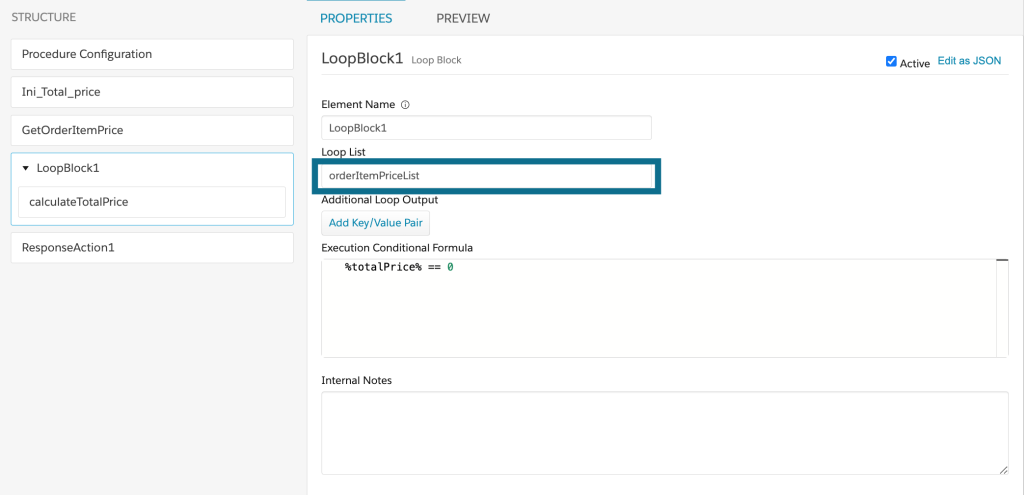
We will pass the list orderItemPriceList that we got from the DR action GetOrderItemPrice from above. We also have the Execution Conditional Formula added to demonstrate how it works.
Now we will a Set Value (calculateTotalPrice) action in the LoopBlock1 block.
Set Value (calculateTotalPrice)
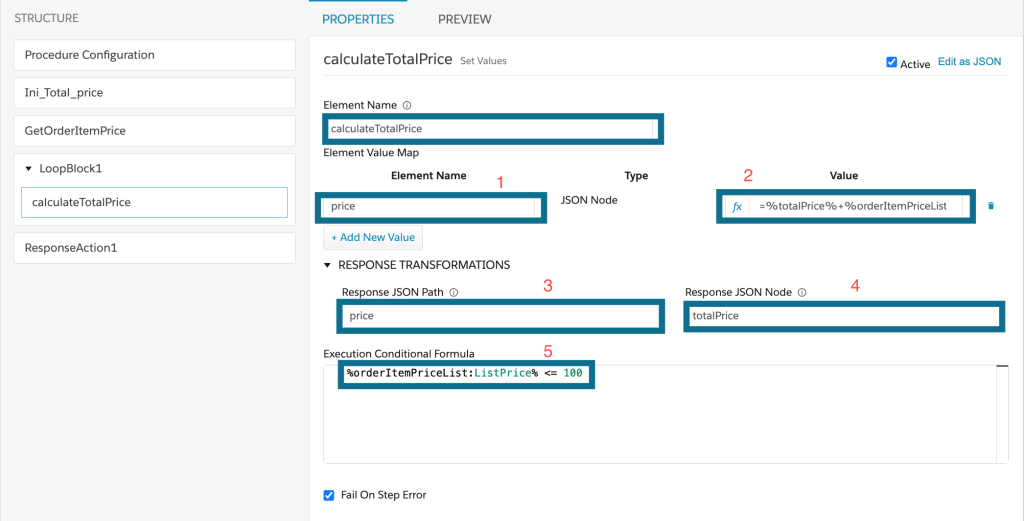
The Set Value Element is called calculateTotalPrice
1. Name of the variable we are trying to set (price)
2. Value of the price. Here we are summarizing the totalPrice and the price of the current item =%totalPrice%+%orderItemPriceList:ListPrice%
%totalPrice% comes form Ini_Total_price and then we add the price of the current item in the loop %orderItemPriceList:ListPrice%
%List:Key%
3. The Path of the response (price)
4. Assigning the value back to totalPrice so the next time we have the value summarized up till this point in the variable totalPrice.
5. Execution Conditional Formula to only add prices that are less that or equal to 100. %orderItemPriceList:ListPrice% <= 100. Same syntax as 2.
Now the last step is to add the Response Action (ResponseAction1)
Response Action (ResponseAction1)

We are returning a response Additional output response of the Response Action
as totalPrice and the value %totalPrice%

The totalPrice 168 as we are not adding 119 from here, as we added an Execution Conditional in calculateTotalPrice.
Notes:
1. The list that we loop over in the Loop Block can only be a list of Objects, if the list is of String or int it will not loop over it.


