
Salesforce Spring ’26 Release: Key updates, behavior changes, and a complete preparation guide to keep your org stable, secure, and future-ready.
If you’ve been working in Salesforce long enough, you already know the drill – every release brings something new. But the Salesforce Spring ’26 Release isn’t here to play nice. It’s coming with the kind of behind-the-scenes shifts that can either make your org smoother than ever… or expose every hidden shortcut you’ve ignored for years.
And honestly? It’s about time.
This release isn’t shouting for attention with shiny features. It’s quietly tightening the nuts and bolts – security, automation behaviour, integration patterns – and basically asking every admin, developer, consultant, and architect:
“Are you really following Salesforce best practices… or have you been winging it?”
The orgs that prep early will breeze through Spring ’26.
The orgs that don’t… well, they’ll find out the hard way.
So let’s break down exactly what’s changing, what you can expect, and how to prepare without losing your sanity.
Why the Spring ’26 Release Deserves Your Attention?
We’ve all seen seasonal updates from Salesforce: Winter, Spring, Summer. But with Spring ’26, a few things are shifting:
- Behaviour changes are more enforced. Legacy patterns that “just worked” are being deprecated or tightened.
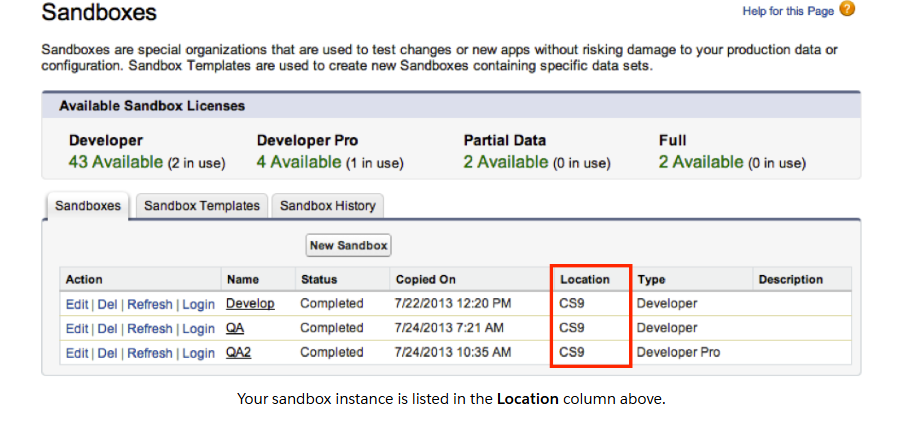
- The sandbox preview window gives you a chance to test, but many will skip it – that’s the risk.
- This isn’t just “new features” but “new expectations”. For admins, developers, architects – you’ll have homework.
In short: Use this release as a spring-cleaning moment for your Salesforce org.
Key Changes & Features in Spring ’26 (What You Should Know)
Here are the major points we know so far – with what changed, why it matters, and your action.
1. Instance URL to My Domain Enforcement
What changed:
- Salesforce is phasing out reliance on hard-coded instance URLs (e.g., na45.salesforce.com) for API traffic and integrations. Instead, you must use My Domain (yourDomain.my.salesforce.com).
- Redirects that used to safeguard old instance URL traffic may stop working in production with Spring ’26.
Why it matters:
- Many older integrations use instance-specific endpoints. Those could fail silently or fail loudly after upgrade.
- If you ignore this, you risk integration downtime, broken UI, or external apps not working.
What you should do:
- In your sandbox: search your codebase (Apex classes, Visualforce pages, middleware configs) for *.salesforce.com patterns referencing instance names.
- Update endpoints and integration config to use My Domain.
- Communicate with third-party vendors: verify their integrations use My Domain.
- Test all critical business flows involving API calls, external systems, data syncs.
2. Visualforce Security – Escaping label Attribute in <apex:inputField>
What changed:
- For Visualforce pages, <apex:inputField> elements’ label attribute will now be automatically escaped to improve security (prevent XSS). If you had manually escaped it before, you may now experience issues (double-escape).
Why it matters:
- Even if Visualforce usage is limited in your org, if you have legacy pages or partner packages, they may fail or render incorrectly.
- If you ignore it, you may face UI glitches, broken pages, or even security vulnerabilities.
What you should do:
- Generate an inventory: list all Visualforce pages in your org, search for <apex:inputField> tags.
- In the sandbox: enable the release update “Escape the Label Attribute of <apex:inputField> Elements…” and test pages. Any break? Fix them.
- Verify partner-managed packages too or at least check with vendors.
3. Flow & Automation Behaviour Changes
What changed (so far):
- The Spring ’26 release includes several Release Updates flagged by Salesforce that change existing behaviour for Flows (and other automation) – e.g., “Restrict User Access to Run Flows” scheduled for enforcement.
- The automation stack is getting stricter: older shortcuts that worked may no longer.
- Metadata tools and release updates list show that features may now require additional permissions or run‐time checks.
Why it matters:
- If you have many Flows (screen flows, autolaunched flows, record-triggered flows), this could impact live business processes.
- Upgrades in Flow might affect flows you built years ago and never revisited.
- Non-technical stakeholders will notice if something breaks mid-process (approvals, automation failures, missing records).
What you should do:
- In sandbox: identify the flows with API version < 65 or older triggers, tag them as “legacy”.
- Run key business scenarios end-to-end in sandbox with the upgrade enabled.
- Review user access: which users are “Flow Runners”, “Flow Admins”. Are permissions tightened?
- Update your documentation/training: if flows behave slightly differently, let users know.
4. Release Timing & Preview Windows
What changed/what you need:
- According to SalesforceBen, the main production windows for Spring ’26 will be January 10, 2026, February 14, 2026, and February 21, 2026 (depending on your instance) for upgrade.
- Sandbox preview windows will likely be in early January 2026 (some sandboxes will receive early upgrades for testing).
Why it matters:
- If you wait until your org goes live without testing in sandbox, you’ll be behind.
- Knowing the window lets you schedule testing, freeze deployments, and prepare user communications.
- Many “upgrade disasters” come from surprise downtime, untested processes or unannounced changes.
What you should do:
- Check your instance name (Setup → Company Information) so you know when your production org upgrade is scheduled.
- Mark your sandbox(s): which ones are “Preview” and will upgrade early.
- Freeze non-critical change deployments at least a week before production upgrade.
- Communicate with business users: “Upgrade coming on [date] – expect possible slight UI/behaviour changes, no major downtime, but testing is going on.”
5. Governance & Technical Debt Clean-Up Opportunity
What changed/what you should see:
- While not always labelled as “feature”, there is a strong undercurrent: Spring ’26 acts as a push to clean old architecture, deprecated code, unmanaged integrations. (Salesforce has flagged multiple “Release Updates” dealing with instance URL, flow restrictions, etc.)
- For 2creative’s audience: this is your chance to shine as both consultant and internal champion.
Why it matters:
- Technical debt slows your org down. When behaviour changes, debt becomes more dangerous.
- If you fix things now in this release window, you’re reducing risk and future cost.
- You’re improving reliability – a win for your users and stakeholders.
What you should do:
- Create a “legacy items” log: e.g., Visualforce pages > X years old, flows > 10 versions, integrations using instance URL, API versions < 60, customized packages not upgraded in the last 2 years.
- Prioritise: which items pose biggest risk (e.g., revenue impacting, customer-facing).
- Include clean-up tasks in your Spring ’26 project plan.
- After production upgrade: set a “post-upgrade review” (30 days later) to capture insights, set next steps for technical debt.
Your Prep Checklist
Here’s the step-by-step you can publish to your audience – a mix of easy actionable items and deeper technical ones.
Beginner Level
- Ask your Salesforce admin: “Which sandbox will receive Spring ’26 preview?”
- Ask: “What is our My Domain URL? Are integrations using it or an old instance URL?”
- Ensure user communication: “Upgrade window: [date], expect possible small changes.”
Intermediate Level
- Inventory: Visualforce pages (especially those built more than 3 years ago).
- Inventory: Flows and automations created before 2023; tag those using old API versions.
- Inventory: Integrations referencing instance URLs (search metadata).
- Schedule sandbox testing: “Enable Release Updates → test key processes”.
Advanced / Architect Level
- Scan metadata: (SELECT Body FROM ApexClass WHERE Body LIKE ‘%.salesforce.com%’ etc) to find instance URL references.
- Look at Flow versions: how many versions exist, how many use deprecated elements?
- Review third-party managed packages: confirm vendor support for Spring ’26.
- Build a post-upgrade monitoring plan: error logs, flow failures, API failures, user feedback loops.
- Define governance: upgrade process for Summer ’26, how you’ll keep org clean going forward.
What Doesn’t Appear to Be Changing (Yet) – But Worth Watching
- Some items previously slated for Spring ’26 may have been postponed or are in preview only. For example: “Switch to a Single Domain Certificate for Your Salesforce Content Delivery Network” was expected but postponed indefinitely.
- Always keep an eye on the official Salesforce Release Notes for last-minute shifts.
Final Thoughts
If you take nothing else away: the Spring ’26 release is your org’s moment to show maturity.
- For admins: you’re not just flipping a switch. You’re shaping how the org runs.
- For developers/architects: you’re cleaning foundations so you can scale.
- For consultants or internal team leads: you’re delivering real value – fewer surprises, better reliability, smarter integrations.
Don’t treat Spring ’26 like “just another release”. Treat it like a milestone:
“Let’s upgrade, test, clean up, strengthen our org – so we run smoother, faster, smarter moving forward.”
The Salesforce Spring ’26 Release isn’t your typical feature drop – it’s a structural shift. It pushes your org toward cleaner architecture, tighter security, smarter integrations, and more predictable automation. This release sets the stage. The real momentum comes from how well you prepare.
Your job right now isn’t to memorize every tiny update.
It’s to get your org ready – test early, clean old patterns, tighten governance, and fix anything that’s been quietly “just working.”
And once Salesforce publishes the official Spring ’26 Release Notes, we’ll break down every feature – line by line – in Part 2 of this series.
So stay tuned. The deep-dive is coming soon.
At 2creative Solutions, we help orgs prepare before things go wrong – not after. Whether you’re reviewing your flows, cleaning technical debt, modernizing integrations, or planning your long-term Salesforce roadmap, this is your moment to upgrade smart.
Want to stay ahead of Spring ’26 – and get notified when Part 2 drops?
We’ve got you covered.
Learn Salesforce with 2creative Solutions
- Website: https://2creative.ca/
- YouTube: 2Creative Solutions
Part 2 – The Complete Spring ’26 Feature Breakdown – releasing soon.


