
How to Call an Apex Class from a Data Mapper in OmniStudio? This guide outlines the step-by-step process to invoke an Apex method from a Data Mapper in OmniStudio using custom metadata and the vlocity.openinterface framework.
Call an Apex Class from a Data Mapper in OmniStudio
1. Create an Apex Class
Create a new Apex class that implements the vlocity.openinterface interface.
Refer the below code:
global without sharing class vlocityFunction implements vlocity_cmt.VlocityOpenInterface {

    public Boolean InvokeMethod(String methodName, Map<String, Object> input, Map<String, Object> output, Map<String, Object> options) {

        try {

            List<Object> arguments = (List<Object>) input.get('arguments');

            switch on methodName {

                when 'trim' {

                    output.put('result', trim(String.valueOf(arguments.get(0))));

                    return true;

                }

                when 'stringLength'{

                    output.put('result', stringLength(String.valueOf(arguments.get(0))));

                }

                when else {

                    return true;

                }

            }

        } catch (Exception ex) {

            System.debug('Error: ' + ex.getMessage() + ' at line ' + ex.getLineNumber());

        }

        return false; // Return false if exception occurs or no case matches

    }

    public static String trim(String stringToTrim) {

        return String.isBlank(stringToTrim) ? '' : stringToTrim.trim();

    }

    public static Integer stringLength(String stringToMeasure) {

        return String.isBlank(stringToMeasure) ? 0 : stringToMeasure.length();

    }

}
2. Define Method Logic
Write the logic inside the Apex class method that needs to be called from OmniStudio. Ensure the method is referenced via invokeMethod to route the call.
3. Configure Custom Metadata
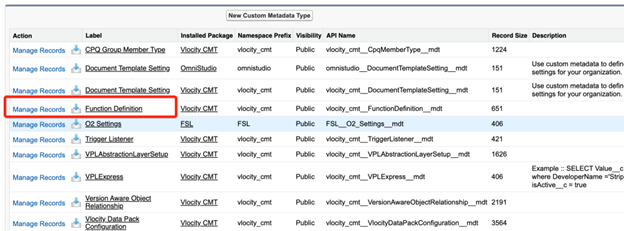
Navigate to Custom Metadata Types in Salesforce to register the Apex method.
Steps:
- Go to Setup > Custom Metadata Types
- Select Function Definition
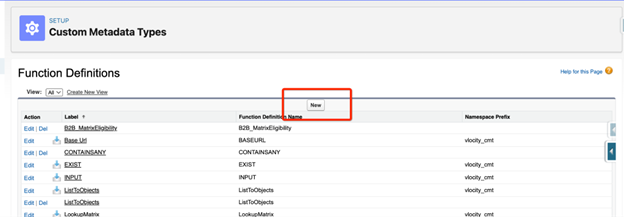
- Click Manage Records
- Click New
| Field Name | Description |
| Label | A user-friendly label (e.g., Get Custom Data) |
| ClassName | Name of the Apex class (e.g., CustomApexClass) |
| Method Name | Method name (e.g., getCustomData) |
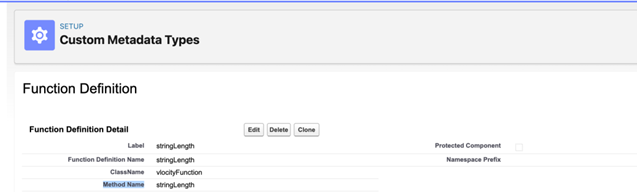
Save the metadata record.
4. Create a Data Mapper in OmniStudio
- Navigate to OmniStudio > Data Mapper
- Create a new Data Mapper element
5. Add a Formula Field to Call Apex
- Within the Data Mapper, create a new Formula field
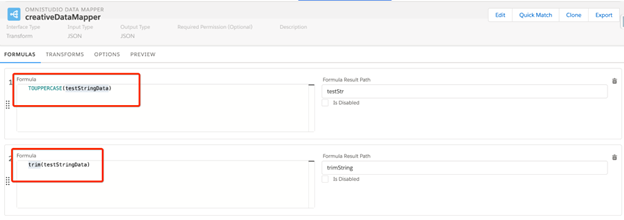
6. Map the Output
- Map the Formula Field to an Output Field in the Data Mapper
- Ensure proper field mapping to return results
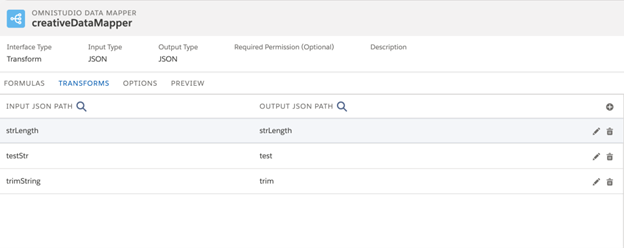
7. Execute the DataRaptor
- Execute and validate the result
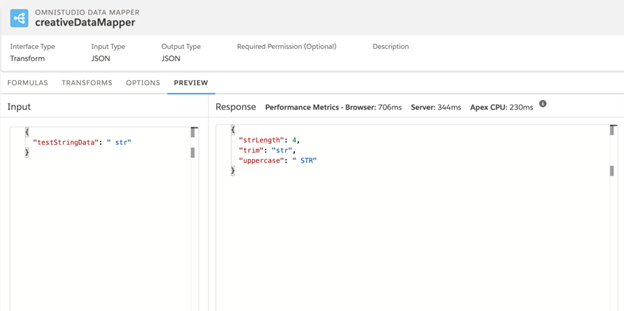
Summary
By following these steps, you can efficiently integrate custom Apex logic with OmniStudio components using the vlocity.openinterface pattern and custom metadata configuration. This enables extensibility and advanced business logic processing within declarative OmniStudio flows.


